
Integration Guidelines for Trides
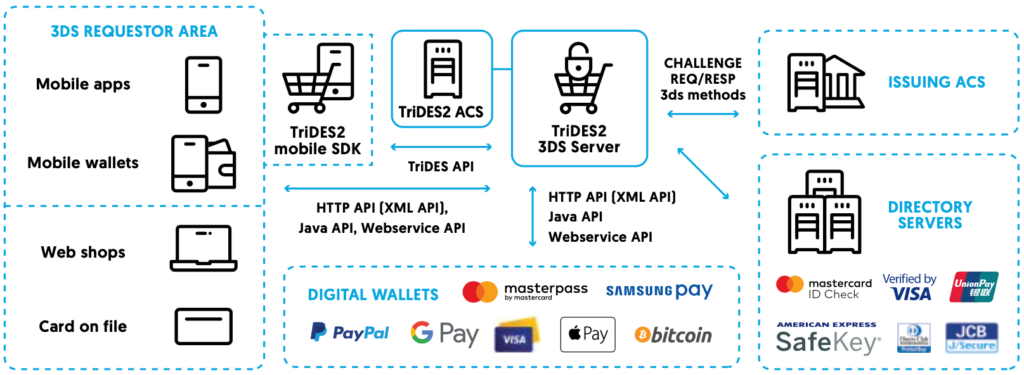
TriDES2 3DS Server enables instant implementation of all 3D Secure programs for acquirers and merchants. Used with a mobile SDK, it ensures simple integration with web-based and mobile application-based purchase channels, digital wallets and other online payment services. By using a certified 3DS Server and a mobile SDK e-commerce and m-commerce service providers can avoid complex 3D Secure development and certification, thus reducing their cost and time to market.
Reduce fraud chargeback expenses
Online fraud is the most common cause for chargebacks in the online payment environment, and it is mostly a burden for the merchant. To the merchants and acquirers that use TriDES2 3DSS and participate in 3D Secure programs, card schemes grant a chargeback liability shift, which transfers the chargeback and fraud-related costs to the issuer.
Key Product Features
- Backward compatible to 3D Secure 1.0.2
- Frictionless and challenge transaction flows
- Outspread types of supported transactions, including recurring payment, instalments, standing orders, direct debit, e-invoicing etc.
- Integration with web browsing and in-app purchasing applications, with a responsive web interface for browsing on a mobile phone
- Management of multiple acquiring institutions in-one 3DS server instance
- Multiple directory servers in one 3DS server instance (Verified by Visa, Mastercard® IdentityCheckTM, American Express Safekey®, Diners Club ProtectBuy®, JCB J/SecureTM, UnionPay UPOP, NSPK MirAccept)
- Easy integration with payment gateways, merchant applications and non-payment applications using HTTP redirection API, XML API, Java API or Webservice API
- Merchant whitelisting
- Merchant and acquiring risk scoring
- Integration with tokenisation services, digital wallets, card on file
- Extensive statistics and reporting
Browser-Based 3DS Flow
Overview
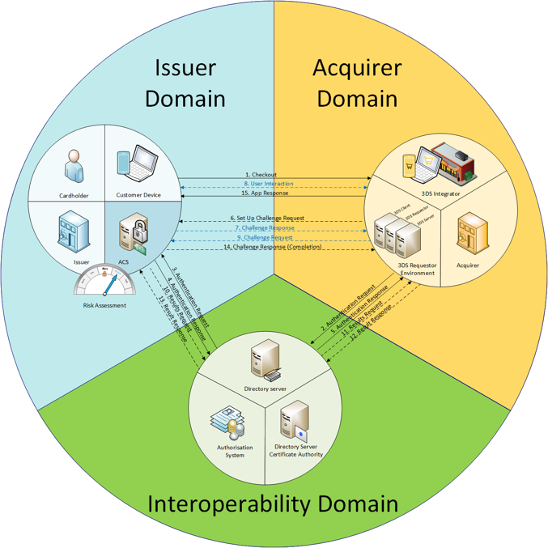
For performing 3D Secure transaction all three domains (issuer, acquirer and interoperability domain) must be present. If one of these domains is not present in the purchase process, the transaction is not part of 3D secure standard.
3D Secure 2.2 authentication flow can be different depending on transaction risk assessment, merchant e-commerce payment solution, authentication method, etc..
Transaction flow
Based on risk analysis by the Issuer ACS, transaction flow can be frictionless, with a challenge or decline. Based on simple risk analysis, Acquirer 3DS Server can suggest to ACS to use one of the flows by sending exemption flag in AReq message. Still, it is ACS decision to accept exemption flag or not.
The frictionless flow is the process of authentication achieved without Cardholder interaction. In this case, Issuer ACS evaluates available transaction data, categorizes the transaction as a low-risk transaction and determines that further Cardholder interaction is not required.
The challenge flow is the process of authentication where Cardholders interaction is required. In this case, ACS evaluates available transaction data, categorizes the transaction as a medium risk transaction and determines that further Cardholder interaction is required.
Challenge flow depends on implemented authentication method and merchant e-commerce payment solution (app-based or bowser-based).
Optimal authentication process implemented within 3-D Secure transaction is commonly the one using existing authentication method adopted by the cardholder. This way user experience stays preserved and change of Issuer’s authentication business rules is avoided.
In browser-based solutions multiple interactions between cardholder and ACS in not allowed.
3DS API integration
This page describes the Asseco 3DS Service and the integration procedure with the 3DS Server.
Introduction
Service methods
The service consists of the following methods:
- v2Supported – method that will check the supported version of the 3D Secure protocol for a card. The use of this method is optional and could be used in environments where fallback to 3DS 1.0.2 should be supported.
- createTransaction – method that performs the AReq/ARes part of the flow and returns the status of the check for browser-initiated transactions.
- authenticationResult – method that returns the authentication status for a specific 3D Secure transaction.
Security
All communication between 3DS Requestor and 3DS Service is done through a mutually authenticated TLS1.2 channel. SSL and other versions of TLS are not supported.
Integration
In order to successfully perform 3DS2 transactions, PGW’s should integrate themselves with the Asseco 3DS Server.
There are two types of 3DS2 transactions:
Transactions where the Issuer has determined that Challenge isn’t necessary. Issuer will determine whether the transaction should be authorized or not, depending on the status of the transaction.

Transactions where the cardholder will have to authenticate himself in order to successfully finish the transaction.

Fallback to 3DS v1
Fallback to v1 is not in the scope of this document since 3DS Server doesn’t handle fallback to v1 internally. It is up to the 3DS Requestors to implement the fallback functionality based on the response received from 3DS Server.
- User enters card details and selects checkout
- 3DS Requestor initializes the transaction and calls the v2Supported method of 3DS Server.
- 3DS Server checks the cache and returns the response to v2Supported
- 3DS Requestor checks the status of the response v2Supported method
- If status equals V1_SUPPORTED the 3DS Requestor should fallback to v1. Optionally, since status ERROR means that some unexpected error occurred 3DS requestors can also fallback to v1.
- 3DS Requestor should call MPI to check the enrollment of card in 3DS v1
- MPI sends the VEReq to Directory Server for v1
- Directory Server checks the enrollment and returns the VERes to MPI
- MPI evaluates the received VERes and returns the enrollment response to 3DS Requestor
- 3DS Requestor handles the transaction according to the received enrollment status.

3DS Method Handling
The 3DS Method allows for additional browser information to be gathered by an ACS prior to receipt of the AReq message to help facilitate the transaction risk assessment. The use of the 3DS Method by an ACS is optional.
- If the response of the v2Supported method has the 3dsMethodUrl set the 3DS Requestor should invoke the 3DS Method URL.
- Create a JSON object with the 3DS Method Data elements, then Base64url encode the JSON object.
- Render a hidden HTML iframe in the Cardholder browser and send a form with a field named threeDSMethodData containing the JSON Object via HTTP POST to the ACS 3DS Method URL.
- If the 3DS Method completes within 10 seconds, then the 3DS Requestor will notify the 3DS Server to set the 3DS Method Completion Indicator = Y. If the 3DS Method does not complete in 10 seconds, set the 3DS Method Completion Indicator to = N.
- Otherwise, the 3DS Requestor will use the value U for 3DS Method Completion Indicator parameter of createTransaction method.
Allowed values for 3DS Method Completion Indicator are:
- Y - Successfully completed
- N - Did not successfully complete
- U - Unavailable - 3DS Method URL was not present in the PRes message data for the card range associated with the Cardholder Account Number.
The following table defines the data elements sent in the 3DS Method. The data is exchanged between the 3DS Requestor via the cardholder browser.
The HTTP field name is threeDSMethodData.
The property is a JSON object that consists of two parameters:
| Data Element/Field Name | Description |
|---|---|
| threeDSMethodNotificationURL | The URL that will receive the notification of 3DS Method completion from the ACS. This is sent in the initial request to the ACS from the 3DS Requestor executing the 3DS Method. |
| threeDSServerTransID | A unique identifier for the transaction that will be the same as the 3DS Server Transaction ID in the AReq message. |
3DS Server transaction ID: 25c1b02f-ec99-4b95-bc74-f257fd66b2ee
3DS Method Notification URL: https://nestpay.tr/core/tdsMethodCallback
Generated threeDSMethodData object:
{
"threeDSMethodNotificationURL":https://nestpay.tr/core/tdsMethodCallback",
"threeDSServerTransID":"25c1b02f-ec99-4b95-bc74-f257fd66b2ee"
}
Base64 encoded threeDSMethodData:
base64Encoded(Generated threeDSMethodData)
Generated HTML form containing the threeDSMethodData:
<form name="MethodForm" action="<3dsMethodUrl>" method="POST">
<input type="hidden" name="threeDSMethodData" value="base64Encoded(Generated threeDSMethodData)">
</form>
Transaction flow
The flow of a 3DS2 transaction is as follows, this doesn’t include steps before checkout, but only after it has been determined that 3DS2 is necessary.
- Call the v2Supported method in order to check whether 3DS2 is supported for the card identified by PAN and channel on which the transaction is being executed.
- If the response has been received check the received status:
- V2_VERSION_NOT_SUPPORTED – The supported version of 3DS2 by the Issuer is not supported by the 3DS Server. Because of that the processing should stop and the transaction should not be authorized.
- ERROR – There has been some error on the 3DS Server. It is up to 3DS Requestor to decide whether they want to terminate the transaction or fallback to 3DS v1.
- V1_SUPPORTED – Card is not found inside of 3DS Servers cache, meaning v2 is not supported, so it is assumed that v1 is supported. 3DS Requestor sholud fallback to 3DS v1.
- If the response has been received check the received status:
- V2_SUPPORTED – 3DS2 is possible for the card and the processing should continue.
- If 3dsMethodUrl parameter is set, do the steps described in 3DS Method Handling chapter
- Fetch the cardholder and transaction data necessary for createTransaction method.
- Call the createTransaction method.
- If the call returned the response, check the returned transactionStatus
- If the transStatus != C, Challenge isn’t necessary, fetch the authentication data from the response.
- If transStatus == Y or transStatus == A, fetch the authenticationValue and eci values and use them in authorization request for the transaction.
- Otherwise
- terminate the processing and don’t authorize the transaction.
- fetch the cardholderInfo, and if it contains any data, show that information to the cardholder on the merchant’s site.
- Otherwise perform the challenge of the cardholder
- Generate and prepare the response as described in chapter CReq request
- Send the generated request to the cardholder
- If the response is received on the Notification URL, call the authenticationResult method of the 3DS Server
- If the method returned a result, check the authenticated parameter
- If authenticated == true, fetch the authenticationValue and eci values and use them in authorization request for the transaction.
- Otherwise, terminate the processing and don’t authorize the transaction.
- If the method returned a result, check the authenticated parameter
- In case of timeout, also call the authenticationResult method of the 3DS Server
- If the method returned a result, check the authenticated parameter
- If authenticated == true, fetch the authenticationValue and eci values and use them in authorization request for the transaction.
- Otherwise, terminate the processing and don’t authorize the transaction.
- If the method returned a result, check the authenticated parameter
- Otherwise, terminate the processing and don’t authorize the transaction.
- If the transStatus != C, Challenge isn’t necessary, fetch the authentication data from the response.
- Otherwise, terminate the processing and don’t authorize the transaction.
Note: Only transactions with transStatus A or Y are considered authenticated and should have the authenticationValue and eci set.
In case of transactions with Mastercard cards, eci flag will be set for all transaction statuses except status E.
When checking the Authentication results of a transaction the following procedure should be done:

Cardholder info
If the transaction is declined during the initial AReq/ARes exchange, meaning there haven’t been any authentication requests towards users, issuers can set the cardholderInfo property of the ARes response which contains additional information for cardholders that might be necessary for the successful execution of 3DS2 transaction.
3DS Server will return cardholderInfo in the response of the authenticationResult method.
The recommendation is to show this information, if available, to users on the merchant’s screen.
Request timeouts
Since at one point in the transaction the processing will be done between ACS and the cardholder, timeouts for requests/responses should be enforced.
This is especially important when waiting for a response from the ACS on the Notification endpoint.
PGW’s should have the option to define a timeout, so that after it has been reached the authentication light box/iframe should be closed/hidden, and authenticationResult of the 3DS Server should be called.
The further processing should depend on the returned authentication status.
Methods
Method v2Supported
The method that checks whether the card can be used to perform a 3DS2 transaction or not. The method will also return the 3DS Method URL if defined by the Issuer of the card.
Depending on the received status, 3DS Requestor should continue with the 3DS v2 transaction, fallback to v1 or end processing.
| Path | /v2Supported/check |
| Supported methods | POST |
| Consumes | application/json |
| Produces | application/json |
| Parameter | Type | Description |
|---|---|---|
| pan | String | 13-19 digit string representing a valid card PAN. |
| deviceChannel | String | Indicates the type of channel interface being used to initiate the transaction. Values accepted: 01 = App-based (APP) 02 = Browser (BRW) 03 = 3DS Requestor Initiated (3RI) |
The response code when the input (PAN) is invalid should be 405. Otherwise, the service should return the status and the URL of the 3DS Server Transaction ID and 3DS Method.
The status can be one of the following values:
- V2_VERSION_NOT_SUPPORTED – The supported version of 3DS2 by the Issuer is not supported by the 3DS Server. Because of that the processing should stop and the transaction should not be authorized.
- ERROR – There has been some error on the 3DS Server. It is up to 3DS Requestor to decide whether they want to terminate the transaction or fallback to 3DS v1.
- V1_SUPPORTED – Card is not found inside of 3D Servers cache, meaning v2 is not supported, so it is assumed that v1 is supported. 3DS Requestor should fallback to 3DS v1.
- V2_SUPPORTED – 3DS2 is possible for the card and the processing should continue.
{
"pan": 4308331682827506,
"deviceChannel": "02"
}
{
“versionStatus”: “V2_SUPPORTED”,
“3dsMethodUrl”: “https://nekiurl.con/3dsmethod”,
“3dssTransactionId”: “123e4567-e89b-12d3-a456-556642440000”
}
Method createTransaction
The method that generates the AReq message and forwards it to the Directory Server to see if Frictionless or Challenge flow should be performed.
| Path | /createTransaction |
| Path with transaction id | /createTransaction/{3DSS_TRANSACTION_ID} |
| Supported methods | POST |
| Consumes | application/json |
| Produces | application/json |
3DSS_TRANSACTION_ID is an optional parameter. If set the same value as received in the response of v2Supported method should be used. Otherwise, 3DSS will generate and return the value for 3DSS_TRANSACTION_ID in the response.
Values for some arguments of createTransaction are derived from functionalities and/or values available in 3DS requestor environment.
Those values should be generated by the 3DS Requestor the following way:
- addrMatch is a parameter that defines whether the billing and shipping addresses are the same.
The parameter can have the following values:
- Y = Shipping Address matches Billing Address
- N = Shipping Address does not match Billing Address
3DS Requestor should compare the two addresses and set the appropriate value for addrMatch.
- payTokenInd is an optional flag that says whether the Cardholder’s PAN has been de-tokenized by the 3DS Requestor.
The only accepted value for payTokenInd is true.
If there hasn’t been any de-tokenization of Account Number on 3DS Requestor side, this parameter should not be included in the call of the createTransaction method.
| Parameter | Type | Mandatory | Description |
|---|---|---|---|
| messageCategory | int | Mandatory | Message category. Can have one of two values: Payment AuthenticationNon Payment Authentication |
| deviceChannel | String | Mandatory | Indicates the type of channel interface being used to initiate the transaction. Values accepted: 01 = App-based (APP) 02 = Browser (BRW) 03 = 3DS Requestor Initiated (3RI) |
| threeRiData | JSON Object | Optional | Indicates the type of 3RI request. |
| threeDSCompInd | String | Mandatory | Indicates whether the 3DS Method successfully completed. Values accepted: Y = Successfully completed N = Did not successfully complete U = Unavailable - 3DS Method URL was not present in the PRes message data for the card range associated with the Cardholder Account Number. |
| pan | String | Mandatory | 13-19 digit string representing a valid card PAN. |
| cardExpiry | String | Mandatory | Expiry date of the card or token. String, 4 characters Format accepted: YYMM |
| payTokenInd | String | Mandatory | A value of True indicates that the transaction was de-tokenised prior to being received by the ACS. This data element will be populated by the system residing in the 3-D Secure domain where the de-tokenisation occurs (i.e., the 3DS Server or the DS). Note: The Boolean value of true is the only valid response for this field when it is present. |
| 3dsrMerchantId | String | Deprecated | 3DS Requestor assigned Merchant identifier. String, maximal length 35 characters. Unused |
| merchantId | String | Mandatory | Merchant identifier registered at directory server. String, maximal length 40 characters. |
| acquirerBin | String | Mandatory | Acquiring institution identification code as assigned by the DS. String, maximal length 11 characters. |
| threeDSRequestor | JSON object | Mandatory | JSON Object containing 3DS requestor info. |
| billingAddress | JSON object | Mandatory (if available), unless market or regional mandate restricts sending this information. | JSON object containing the billing address for the transaction. |
| shippingAddress | JSON object | Mandatory (if available), unless market or regional mandate restricts sending this information. | JSON object containing the shipping address for the transaction. |
| addrMatch | String | Mandatory | A parameter that defines whether the billing and shipping addresses are the same. Y: Shipping Address matches Billing Address N: Shipping Address does not match Billing Address |
| String | Mandatory (if available), unless market or regional mandate restricts sending this information. | Email of the Cardholder. String, maximum 254 characters Value accepted: Shall meet requirements of Section 3.4 of IETF RFC 5322. | |
| cardholderName | String | Mandatory (if available), unless market or regional mandate restricts sending this information. | Name of the Cardholder, 2 – 45 characters. |
| homePhone | JSON Object | Mandatory (if available), unless market or regional mandate restricts sending this information. | JSON Object containing information about Cardholders home phone. |
| mobilePhone | JSON Object | Mandatory (if available), unless market or regional mandate restricts sending this information. | JSON Object containing information about Cardholders mobile phone. |
| workPhone | JSON Object | Mandatory (if available), unless market or regional mandate restricts sending this information. | JSON Object containing information about Cardholders work phone. |
| merchant | JSON Object | Mandatory | JSON object containing Merchant data. |
| purchase | JSON Object | Mandatory | JSON object containing Purchase data. |
| transType | String | Mandatory | Identifies the type of transaction being authenticated. String 2 characters. |
| acctType | String | Mandatory | Indicates the type of account. Length: 2 characters Values accepted: 01 = Not Applicable 02 = Credit 03 = Debit |
| acctID | String | Optional | Additional information about the account optionally provided by the 3DS Requestor. String, maximum 64 characters. |
| account | JSON Object | Mandatory | Refer to Table A.8 of the Protocol and Core Functions Specification for data elements. |
| purchaseInstalData | String | Conditional Required if 3DS Requestor Authentication Indicator = 03. Omitted if not an instalment payment authentication. | Three numerical characters. Value should be greater than 1. |
| merchantRiskIndicator | JSON Object | Optional | Merchant’s assessment of the level of fraud risk for the specific authentication for both the cardholder and the authentication being conducted. Refer to Table A.9 of the Protocol and Core Functions Specification for data elements. |
| recurringExpiry | String | Conditional Required if 3DS Requestor Authentication Indicator = 02 or 03. | Date after which no further authorizations shall be performed. |
| recurringFrequency | String | Conditional Required if 3DS Requestor Authentication Indicator = 02 or 03. | Indicates the minimum number of days between authorizations. |
| browser | JSON Object | Mandatory (if available), unless market or regional mandate restricts sending this information. | JSON object containing browser data. |
| notificationUrl | String | Mandatory | Notification URL is the URL of an endpoint in the 3DS Requestor environment which will receive the requests from ACS containing the final CRes message. The endpoint is usually a part of the Merchant/PGW site. |
| challengeWindowSize | String | Mandatory | Dimensions of the challenge window that has been displayed to the Cardholder. Values accepted: 01 - 250 x 400 02 - 390 x 400 03 - 500 x 600 04 - 600 x 400 05 - Full screen |
| protocolVersion | String | Mandatory | Version of 3DS protocol to be used. |
| Parameter | Type | Mandatory | Description |
|---|---|---|---|
| transStatus | String | Mandatory | Character value defining the status of the execution. In case a valid ARes has been received the value should be equal to transStatus of the ARes message, or in case of an error the status should be E. |
| threeDSServerTransID | String | Mandatory | Identifier of the 3DS Server transaction. |
| additionalData | JSON Object | Optional | Optional transaction data that might be returned. |
| errorCode | String | Optional | Code defining the type of error that as occurred. |
| errorDescription | String | Optional | Textual description of the error. |
| eci | String | Optional | Electronic Commerce Indicator. In case of Visa cards, should be only present in case status is A, Y or C. But in case of Mastercard cards can be present for all returned statuses. |
| authValue | String | Optional | Authentication value generated by the ACS for the transaction, should be only present in case status is A or Y, should be only present in case status is A or Y. |
| dsTransID | String | Optional | Directory Server identifier of the transaction. |
| cardholderInfo | String | Optional | Short text, 128 characters, provided by the ACS/Issuer to Cardholder during a Frictionless transaction that was not authenticated by the ACS. The Issuer can optionally provide information to Cardholder. For example, "Additional authentication is needed for this transaction, please contact (Issuer Name) at xxx-xxx-xxxx." |
| creq | String | Optional | Base64url encoded value of the CReq message that should be sent to the ACS. |
| acsURL | String | Optional | URL of ACS endpoint to which the CReq message should be sent. |
Example request when calling the method with the 3DS Server identifier e.g. createTransaction/050d09cc-f096-4f97-8043-b34889837887.
{
"messageCategory": "02",
"deviceChannel": "02",
"threeDSCompInd": "Y",
"pan": "4308331682827506",
"cardExpiry": "2212",
"3dsrMerchantId": "3dsr Merchant Id",
"merchantId": "merchant Id",
"threeDSRequestor": {
"id": "239",
"name": "EMVCo 3DS Test Requestor",
"url": "http://www.ul.com/144213bb-f034-410d-84fe-42723ff028b6",
"threeDSRequestorAuthenticationInd": "01"
},
"billingAddress": {
"line1": "Bill Address Line 1",
"line2": "Bill Address Line 2",
"line3": "Bill Address Line 3",
"city": "Bill City Name",
"postalCode": "Bill Post Code",
"state": "USA",
"country": "840"
},
"shippingAddress": {
"line1": "Bill Address Line 1",
"line2": "Bill Address Line 2",
"line3": "Bill Address Line 3",
"city": "Bill City Name",
"postalCode": "Bill Post Code",
"state": "USA",
"country": "840"
},
"email": "x.y@mail.com",
"cardholderName": "cardholderName",
"homePhone": {
"cc": "123",
"subscriber": "123456789"
},
"workPhone": {
"cc": "123",
"subscriber": "123456789"
},
"mobilePhone": {
"cc": "123",
"subscriber": "123456789"
},
"merchant": {
"mcc": "7922",
"countryCode": "840",
"name": "Test Merchant"
},
"purchase": {
"amount": "19995",
"currency": "191",
"exponent": "2",
"date": "20190523102223"
},
"transType": "01",
"acctType": "03",
"acctID": "acct ID",
"account": {
"chAccAgeInd": "05",
"chAccDate": "20170101",
"chAccChangeInd": "04",
"chAccChange": "20170101",
"chAccPwChangeInd": "05",
"chAccPwChange": "20170101",
"shipAddressUsageInd": "04",
"shipAddressUsage": "20170101",
"txnActivityDay": "1",
"txnActivityYear": "1",
"provisionAttemptsDay": "0",
"nbPurchaseAccount": "1",
"suspiciousAccActivity": "01",
"shipNameIndicator": "01",
"paymentAccInd": "05",
"paymentAccAge": "20170101"
},
"purchaseInstalData": "555",
"merchantRiskIndicator": {
"shipIndicator": "01",
"deliveryTimeframe": "02",
"deliveryEmailAddress": "example@example.com",
"reorderItemsInd": "01",
"preOrderPurchaseInd": "01",
"preOrderDate": "20300101",
"giftCardAmount": "1",
"giftCardCurr": "840",
"giftCardCount": "01"
},
"recurringExpiry": "20170101",
"recurringFrequency": "3",
"browser": {
"ip": "10.135.154.11",
"language": "en",
"javaEnabled": true,
"acceptHeader": "text/html,application/xhtml+xml,application/xml;q=0.9,/;q=0.8",
"userAgent": "Mozilla/5.0 (Windows NT 6.1; Win64; x64; rv:47.0) Gecko/20100101 Firefox/47.0",
"colorDepth": "32",
"screenHeight": "800",
"screenWidth": "600",
"timeZone": "0"
},
"notificationURL": "https://3dsrequestor.asseco-see.hr/notification",
"challengeWindowSize": "02",
"protocolVersion": "2.1.0"
}
{
"transStatus": "C",
"threeDSServerTransID": "050d09cc-f096-4f97-8043-b34889837887",
"errorCode": null,
"errorDescription": null,
"eci": null,
"authValue": null,
"dsTransID": null,
"creq": "eyJ0aHJlZURTU2VydmVyVHJhbnNJRCI6IjA1MGQwOWNjLWYwOTYtNGY5Ny04MDQzLWIzNDg4OTgzNzg4NyIsIm1lc3NhZ2VUeXBlIjoiQ1JlcSIsImFjc1RyYW5zSUQiOiIyLjEuMCIsImNoYWxsZW5nZVdpbmRvd1NpemUiOiIwMiIsIm1lc3NhZ2VWZXJzaW9uIjoiMi4xLjAifQ==",
"acsURL": "http://localhost:1234/dummy-acs-url",
"cardholderInfo": null,
"additionalData": {
"ares": {
"messageType": "ARes",
"messageVersion": "2.1.0",
"threeDSServerTransID": "050d09cc-f096-4f97-8043-b34889837887",
"acsReferenceNumber": "00001ACS00001",
"acsURL": "http://localhost:1234/dummy-acs-url",
"acsTransID": "3cbd0751-24cd-44a2-80a9-c854e7edc3bd",
"dsReferenceNumber": "MSIGNIA_MOCK_DS",
"dsTransID": "1ad8dd99-cf08-405a-9607-f4a2414587af",
"acsChallengeMandated": "Y",
"acsOperatorID": "mX21mRFudf",
"authenticationType": "02",
"authenticationValue": "rsycufapnyqbdzebtdtaweekgida",
"eci": "xs",
"transStatus": "C"
}
}
}
The full list of possible transaction statuses. Some of the statuses might not be returned in the response of createTransaction response.
| Status | Description |
|---|---|
| Y | Authentication/ Account Verification Successful |
| N | Not Authenticated /Account Not Verified; Transaction denied |
| U | Authentication/ Account Verification Could Not Be Performed; Technical or other problem, as indicated in ARes or RReq |
| A | Attempts Processing Performed; Not Authenticated/Verified, but proof of attempted authentication/verification is provided |
| C | Challenge Required; Additional authentication is required using the CReq/CRes |
| R | Authentication/ Account Verification Rejected; Issuer is rejecting authentication/verification and request that authorisation not be attempted. |
| E | 3DSS error; Technical or other problem |
Error codes are divided into two categories:
- EMVCo 3D Secure protocol error codes
- Returned by DS and part of Erro message in additionalData object
- 3DSS error codes
- Returned by 3DSS in errorCode field
| Value | Error Code | Error Description | Error Detail |
|---|---|---|---|
| 101 | Message Received Invalid | One of the following: Message is not AReq, ARes, CReq, CRes, PReq, PRes, RReq, or RRes Valid Message Type is sent to or from an inappropriate component (such as AReq message being sent to the 3DS Server) Message not recognised | One of the following: Invalid Message Type Invalid Message for the receiving component Invalid Formatted Message |
| 102 | Message Version Number Not Supported | Message Version Number received is not valid for the receiving component. | All supported Protocol Version Numbers in a comma-delimited list. |
| 201 | Required Data Element Missing | A message element defined as required is missing from the message. | Name of required element(s) that was omitted; if more than one element is detected, this is a comma-delimited list. Parent Example: messageType Parent/Child Example: acctInfo.chAccAgeInd |
| 202 | Critical Message Extension Not Recognised | Critical message extension not recognised. | ID of critical Message Extension(s) that was not recognised; if more than one extension is detected, this is a comma-delimited list of message identifiers that were not recognised. |
| 203 | Format of one or more Data Elements is Invalid according to the Specification | Data element not in the required format or value is invalid as defined in Table A.1 Message Version Number does not match the value set by the 3DS Server in the AReq message. | Name of the invalid element(s); if more than one invalid data element is detected, this is a comma-delimited list. |
| 204 | Duplicate Data Element | The valid data element presents more than once in the message. | Name of duplicated data element; if more than one duplicate data element is detected, this is a comma-delimited list. |
| 301 | Transaction ID Not Recognised | Transaction ID received is not valid for the receiving component. | The Transaction ID received was invalid. |
| 302 | Data Decryption Failure | Data could not be decrypted by the receiving system due to technical or other reasons. | Description of the failure. |
| 303 | Access Denied, Invalid Endpoint | Access denied, invalid endpoint. | Description of the failure. |
| 304 | ISO Code Invalid | ISO code not valid per ISO tables (for either country or currency), or code is one of the excluded values listed in Table A.5. | Name of the invalid element(s); if more than one invalid element is detected this is a comma-delimited list If Challenge Request, Purchase currency and Challenge Request.Purchase exponent form an invalid pair, list both as Error Description. |
| 305 | Transaction data not valid | If in response to an AReq message: Cardholder Account Number is not in a range belonging to Issuer If in response to a CReq, and a CReq message was incorrectly sent, one of the following: CReq message was received by the wrong ACS CReq message was not sent, based on the values in the ARes message CReq message with this ACS Transaction ID has already been received and processed | Name of element(s) that caused the ACS to decide that the AReq message or CReq message was incorrectly sent; if more than one invalid element is detected this is a comma-delimited list. |
| 306 | Merchant Category Code (MCC) Not Valid for Payment System | Merchant Category Code (MCC) not valid for Payment System. | For example, Invalid MCC received in the AReq message. |
| 307 | Serial Number not Valid | Serial Number not valid. | For example, Invalid Serial number in the PReq/PRes message (e.g., too old, not found). |
| 402 | Transaction Timed Out | Transaction timed-out. | For example, Timeout expiry reached for the transaction. |
| 403 | Transient System Failure | Transient system failure. | For example, a slowly processing back-end system. |
| 404 | Permanent System Failure | Permanent system failure. | For example, a critical database cannot be accessed. |
| 405 | System Connection Failure | System connection failure. | For example, the sending component is unable to establish the connection to the receiving component. |
| Error Code | Error Description | Error Detail | Action |
|---|---|---|---|
| 001 | Acquirer not defined | The acquirer sent in createTransaction request is not defined in TDSS_ACQUIRER_BIN table | Add the acquirer and assign it a DS |
| 003 | Invalid Response | DS returned an unexpected response | Examine the EMVCo 3DS Erro in additionalData to determine the problem |
| 004 | Transaction is not defined | A caller attempted to recall a transaction with an ID that is not present in the system | Check the ID being sent |
| 005 | Transaction data missing or is not valid | A mandatory data element has not been provided or is in invalid format | Examine the EMVCo 3DS Erro or errorDescription and errorDetail fields to determine the problem |
| 006 | Error generating CReq request | The CReq request could not be generated because of the system failure | Examine the other fields describing the error |
| 007 | Transaction timed out on DS | The timeout occurred when contacting DS | Check DS URL and if it is available to 3DSS |
| 008 | General DS communication failure | All other communication problems while contacting DS | Check DS URL and if it is available to 3DSS |
| 009 | Bad request | Data in the request are not by specification | Correct the request data |
| 010 | 3D Secure Version 2 is not available | Account number (PAN) provided in createTransaction request is not participating in 3D Secure 2.0 | |
| 011 | The card range cache is empty | No information about card ranges participating in 3D Secure 2.0 is present in the database | Make sure that 3DSS initiated and downloaded card range cache (PR cache) from DS |
If createTransaction method returned transStatus=C, that means that Challenge of the user should be performed.
When the deviceChannel=02 (Browser) i.e. the transaction is initiated through a browser and not through a mobile app the 3DS Requestor should generate a response that contains the returned CReq message that should be submitted to ACS.
Optional data used to accommodate the different methods 3DS Requestor systems handle session information.
If the 3DS Requestor system does not maintain a session for a given authentication session, the 3DS Requestor Session Data field can carry any data the 3DS Requestor needs to continue the session.
If the 3DS Requestor system can associate the final post with the original session without further assistance, the 3DS Requestor Session Data field may be missing.
Because the content of this field varies by 3DS Requestor implementation, the ACS must preserve the content unchanged and without assumptions.
After the authentication has been finished, the ACS will send information about the authentication status to the Notification endpoint located in the 3DS Requestor environment.
The URL of the endpoint is defined by createTransaction parameter notificationUrl.
When 3DS Requestor receives a request to the endpoint defined in notificationUrl it should call the authenticationResult method to get the final authentication results for the transaction.
Method authenticationResult
Method that returns the authentication result for the defined 3DS Server transaction id.
Depending on the type of 3DS transaction the method has an optional parameter cres which can contain a final CRes or Erro message.

| Path | /authenticationResult/{3DSS_TRANSACTION_ID} |
| Supported methods | GET |
| Consumes | application/json |
| Produces | application/json |
3DSS_TRANSACTION_ID is the identifier of the 3DS Server transaction.
| Parameter | Type | Mandatory | Description |
|---|---|---|---|
| cres | String | Optional | Optional argument that contains the Base64url encoded final CRes or Erro message received by 3DS requestor on the Notification endpoint. |
The method returns the status of the authentication and in case of successful authentication the Authentication Value and ECI flag.
| Parameter | Type | Mandatory | Description |
|---|---|---|---|
| authenticated | boolean | Mandatory | Indicates that the authentication was successful. true – transaction authenticated false – transaction not authenticated or Erro message received. |
| transStatus | String | Mandatory | The final transaction status for the transaction. The list of possible transaction statuses is described in the chapter Transaction statuses. |
| authenticationValue | String | Optional | Authentication value generated by the ACS for the transaction should be only present in case the status is A or Y. |
| eci | String | Optional | Electronic Commerce Indicator. |
| dsTransId | String | Optional | DS Transaction Identifier, present if available. |
Example request when calling the method with the 3DS Server transaction identifier identifier e.g. authenticationResult/050d09cc-f096-4f97-8043-b34889837887
{
"authenticated": false,
"transStatus": "N",
"authenticationValue": "",
"eci": "xs",
"dsTransID": "1ad8dd99-cf08-405a-9607-f4a2414587af"
}
NOTE: After data is fetched the first time, the authentication value will be deleted from the database and an empty string will be returned every time after for the authentication value.
JSON objects
JSON object containing 3DS Requestor info consists of the following data:
- id – identifier of the 3DS Requestor. String, maximum 35 characters.
- name – 3DS requestor name. String, maximum 40 characters.
- url – URL of the 3DS Requestor. String, should be a fully qualified URL, maximum 2048 characters
- challengeIndicator – Optional, indicates whether a challenge is requested for this transaction. Possible values:
- 01 = No preference
- 02 = No challenge requested
- 03 = Challenge requested: 3DS Requestor Preference
- 04 = Challenge requested: Mandate
- threeDSRequestorAuthenticationInd - Indicates the type of Authentication request. Possible values:
- 01 = Payment transaction
- 02 = Recurring transaction
- 03 = Instalment transaction
- 04 = Add card
- 05 = Maintain card
- 06 = Cardholder verification as part of EMV token ID&V
- authInfo - Optional information about how the cardholder authenticated during login to their 3DS Requestor account.
- priorAuthInfo - Optional information about a 3DS cardholder authentication that occurred prior to the current transaction.
Example:
“threeDSRequestor” : {
"id":"az0123456789",
"name":"Example Requestor name",
"url":“https://threedsrequestor.adomainname.net“,
"threeDSRequestorAuthenticationInd": "01”
}
JSON object containing optional information about how the cardholder authenticated during login to their 3DS Requestor account.
- threeDSReqAuthData - Data that documents and supports a specific authentication process. In the current version of the specification, this data element is not defined in detail, however the intention is that for each 3DS Requestor Authentication Method, this field carry data that the ACS can use to verify the authentication process. For example, for method:
- 02 - field can carry generic 3DS Requestor authentication information
- 03 - data element can carry information about the provider of the federated ID and related information
- 04 - data element can carry the FIDO attestation data (including the signature). In future versions of the specification, these details are expected to be included.
- Length: maximum 2048 bytes
- JSON Data Type: String
- Value accepted: Any
- threeDSReqAuthMethod - Mechanism used by the Cardholder to authenticate to the 3DS Requestor.
- Length: 2 characters
- JSON Data Type: String
- Values accepted:
- 01 = No 3DS Requestor authentication occurred (i.e. cardholder “logged in” as guest)
- 02 = Login to the cardholder account at the 3DS Requestor system using 3DS Requestor’s own credentials
- 03 = Login to the cardholder account at the 3DS Requestor system using federated ID
- 04 = Login to the cardholder account at the 3DS Requestor system using issuer credentials
- 05 = Login to the cardholder account at the 3DS Requestor system using third-party authentication
- 06 = Login to the cardholder account at the 3DS Requestor system using FIDO Authenticator
- threeDSReqAuthTimestamp - Date and time in UTC of the cardholder authentication.
- Length: 12 characters
- JSON Data Type: String
- Format accepted:
- Date format = YYYYMMDDHHMM
JSON object containing optional information about a 3DS cardholder authentication that
occurred prior to the current transaction.
- threeDSReqPriorAuthData - Data that documents and supports a specific authentication process.
- In the current version of the specification this data element is not defined in detail, however the intention is that for each 3DS Requestor Authentication Method, this field carry data that the ACS can use to verify the authentication process. In future versions of the specification, these details are expected to be included.
- Length: maximum 2048 bytes
- Format: Any
- threeDSReqPriorAuthMethod - Mechanism used by the Cardholder to previously authenticate to the 3DS Requestor.
- Length: 2 characters
- JSON Data Type: String
- Values accepted:
- 01 = Frictionless authentication occurred by ACS
- 02 = Cardholder challenge occurred by ACS
- 03 = AVS verified
- 04 = Other issuer methods
- threeDSReqPriorAuthTimestamp - Date and time in UTC of the prior cardholder authentication.
- Length: 12 characters
- JSON Data Type: String
- Format accepted:
- Date format = YYYYMMDDHHMM
- threeDSReqPriorRef - This data element provides additional information to the ACS to determine the best approach for handing a request.
- Length: 36 characters
- JSON Data Type: String
- Value accepted:
- This data element contains an ACS Transaction ID for a prior authenticated transaction (for example, the first recurring transaction that was authenticated with the cardholder).
JSON object containing address info used for billingAddress and shippingAddress:
- line1 – First line of the street address or equivalent local portion of the address. String, maximum 50 characters.
- line2 – Second line of the street address or equivalent local portion of the Cardholder address. String, maximum 50 characters.
- line3 – Third line of the street address or equivalent local portion of the address. String, maximum 50 characters.
- city - The city of the Cardholder address. String, maximum 50 characters.
- postalCode - ZIP or other postal code of the Cardholder address. String, maximum 16 characters.
- state - The state or province of the Cardholder address. String, maximal 3 characters. Should be the country subdivision code defined in ISO 3166-2.
- country - The country of the Cardholder address. ISO 3166-1 numeric three-digit country code, other than exceptions listed in the table below:
| ISO Code | Value Not Permitted for 3-D Secure | Definition |
|---|---|---|
| ISO 4217 | 955 | European Composite Unit |
| ISO 4217 | 956 | European Monetary Unit |
| ISO 4217 | 957 | European Unit of Account 9 |
| ISO 4217 | 958 | European Unit of Account 17 |
| ISO 4217 | 959 | Gold |
| ISO 4217 | 960 | I.M.F. |
| ISO 4217 | 961 | Silver |
| ISO 4217 | 962 | Platinum |
| ISO 4217 | 963 | Reserved for testing |
| ISO 4217 | 964 | Palladium |
| ISO 4217 | 999 | No currency is involved |
| ISO 4217 | 901–999 | Reserved by ISO to designate country names not otherwise defined |
Example:
“billingAddress” : {
"line1":"Bill Address Line 1",
"line2":"Bill Address Line 2",
"line3":"Bill Address Line 3",
"city":"Bill City Name",
"postalCode":"Bill Post Code",
"state":"CO",
"country":"840"
}
JSON object defining the phone number. Consists of the following fields:
- cc – Country code. String, 1 – 3 characters.
- subscriber – Subscriber number. String, maximum 15 characters.
Example:
"mobilePhone": {
"cc":"123",
"subscriber":"123456789"
}
Refer to ITU-E.164 for additional information on format and length.
JSON object defining merchant. Consists of the following fields:
- mcc - Merchant Category Code, String 4 characters.
- countryCode - Merchant Country Code. String 3 characters, ISO 3166-1 numeric three-digit country code.
- name - Merchant Name. String, maximal 40 characters.
JSON Object defining Purchase. Consists of the following fields:
- amount - Purchase amount in minor units of currency with all punctuation removed. String, maximum 48 characters, e.g. If the purchase amount is USD 123.45, element will contain the value 12345.
- currency - ISO 4217 three-digit currency code.
- exponent - Minor units of currency as specified in the ISO 4217 currency exponent. 1 character.
- date - Date and time of the purchase, expressed in UTC. String, 14 characters
- Formatted: YYYYMMDDHHMMSS
JSON object containing Browser info. Consists of the following fields:
- ip - IP address of the browser as returned by the HTTP headers to the 3DS Requestor. String, maximum 45 characters
- language - Value representing the browser language as defined in IETF BCP47. String, 1–8 characters
- javaEnabled - Boolean that represents the ability of the cardholder browser to execute Java. Accepted values are true or false.
- acceptHeader - Exact content of the HTTP accept headers as sent to the 3DS Requestor from the Cardholder’s browser. String, maximum 2048 characters
- userAgent - Value representing the bit depth of the color palette for displaying images, in bits per pixel. String, 1-2 characters.
- colorDepth - Value representing the bit depth of the color palette for displaying images, in bits per pixel. String, 1-2 characters.
- screenHeight - Total height of the Cardholder’s screen in pixels. String, 1–6 characters.
- screenWidth - Total width of the cardholder’s screen in pixels. String, 1–6 characters.
- timeZone - Time difference between UTC time and the Cardholder browser local time, in minutes. String, 1–5 numerical characters.
JSON object containing the 3RI Indicator.
3RI transaction is a 3-D Secure transaction initiated by the 3DS Requestor for the purpose of confirming an account is still valid. The main use case is recurrent transactions (TV subscriptions, utility bill payments, etc.) where the merchant wants to perform a Non-Payment transaction to verify that a subscription user still has a valid form of payment.
- threeRIInd - Indicates the type of 3RI request.
- Values accepted:
- 01 = Recurring transaction
- 02 = Instalment transaction
- 03 = Add card
- 04 = Maintain card information
- 05 = Account verification
- Values accepted:
Example:
"threeRiData": {
"threeRIInd": "01"
}


