What is App Protector?
Solution concept
App Protector is a solution that utilizes Runtime Application Self-Protection (RASP) that is built on or linked into an application runtime environment. It is capable of controlling application execution, early intrusion detection, and preventing real-time attacks.
App Protector is embedded within an application and kicks in when it starts and runs. It's designed to detect attacks on an application in near real-time. When an application begins to run, App Protector can protect it from malicious input or behavior by analyzing both the app's behavior and the context of that behavior. By using the application to continuously monitor its own behavior, attacks can be identified and mitigated immediately without human intervention.
How does App Protector work?
App Protector incorporates security into a running application by utilizing a mechanism that, regardless of the business logic in the application, checks for threats on the mobile device of an end user. The technology doesn't affect the design of the application because App Protector's detection and protection features operate on the OS platform the application is running on. When a security event in an application occurs, App Protector detects the threat, and following this detection, the app can be configured to react accordingly.
ASEE App Protector implementations
The App Protector solution has three options for implementation:
- App Protector SDK freemium
- App Protector SDK advanced
- App Protector SDK offline
- App Protector SDK online
App Protector SDK freemium is a free SDK that enables developers to implement the limited scope of detections and reactions within mobile applications. SDK is configured by hardcoding which threats to detect and how to respond to these threats (App Protector configuration). This configuration can only be changed in a way to change the hardcoded part of the App Protector configuration. If mobile application vendors want the full scope of the product, the paid versions of SDK are required.
App Protector SDK advanced can be implemented in 2 ways: online or offline, each one can be configured in two dimensions: which tamperings should be detected and how to react to each detected tampering.
App Protector SDK offline is a type of implementation in which the SDK is configured by hardcoding which threats to detect and how to respond to these threats (App Protector configuration). This configuration can only be changed in a way to change the hardcoded part of the App Protector configuration.
App Protector SDK online is connected to App Protector Portal and configuration can be modified through the Portal, meaning that App Protector configuration is not hardcoded in the App Protector SDK.
The online SDK consists of everything that the offline SDK consists of; with an additional component, the App Protector Portal server, which can be used to monitor all attacks reported with App Protector SDK. The portal shows overall statistics and can be used to configure the initial behavior or to change behavior based on current or mostly detected attacks.
Along with App Protector Portal exists a mechanism that helps to manage the behavior of App Protector on a mobile device. App Protector SDK collects and sends security events from mobile applications to App Protector Portal. The portal can be used for analyzing security events/attacks on users’ devices that have installed monitored production applications. Based on the received information, the behavior of App Protector (App Protector configuration) can be changed.
Changing configurations or responses to attacks can be done by sending change information over the App Protector Portal server to App Protector SDK on a mobile device.
NOTE: App Protector offline/online is not related to the end-user device’s internet connection - even if the end-user device has an internet connection (Wi-Fi, 3G, 4G, 5G), if App Protector SDK implementation type is set to offline, App Protector SDK is considered to be offline and there is no connection between App Protector SDK and App Protector Portal.
Supported platforms and languages
There are two versions of App Protector SDK, one is built for Android and one is built for iOS.
Android App Protector SDK is written in Java language but is fully compatible with other Java languages supported on Android, like Kotlin. This framework can be used for target devices from Android KitKat (API level 19) and higher.
iOS App Protector SDK, available in two builds, build for Swift and build for Objective-C. Both versions have all the capabilities in terms of runtime self-protection. This framework can be used for target devices iOS 11.0 and higher.
App Protector SDK
Introduction
App Protector SDK enables limited threat detection on mobile devices. The detections and reactions are related for both implementations, App Protector Offline and App Protector Online modes. The difference is that App Protector Online has a connection to the Portal backend that enables advanced functionalities.
Supported detections are:
- Jailbreaking detection for iOS devices
- Rooting detection for Android devices
- Debugging detection
- Emulator detection
- Hooking detection
- Screen recording detection
- Ongoing call detection
- Screen overlay detection for Android devices
- Accessibility detection for Android devices
- VPN detection
- Proxy detection
- Malicious application detection
- Unknown application origin detection
- ADB detection for Android devices
- Developer options detection for Android devices
- Spoofed location detection for Android devices
Supported reactions to detected threats are:
- Notify the user;
- Fake produced values;
- Terminate application;
Supported detections and reactions are described below.
Security detections
Jailbreak detection (on iOS devices)
Jailbreaking is the process of removing the limitations put in place by a device’s manufacturer. Jailbreaking is generally performed on Apple iOS devices, such as the iPhone or iPad. Jailbreaking removes the restrictions Apple puts in place, allowing users to install third-party software from outside the App Store. Some people may have the perception that jailbreaking is only used for piracy, but this is not the case — jailbreaking allows you to do things like change your iPhone’s default browser and mail client.
Essentially, jailbreaking allows you to use software that Apple doesn’t approve of. It also removes restrictions in interapplication communication, accessing files of other applications, and gives the user root access.
Root detection (on Android devices)
Rooting is the process of removing the limitations put in place by a device’s manufacturer and gaining superuser access to device resources, as on Linux. Rooting is generally performed on Android devices. The process is usually done in order to overcome limitations that carriers put on mobile devices. Rooting gives permissions to alter or replace system applications and settings. It also gives the user permission to execute privileged commands that are not available to the device in its stock configuration. It is also required in order for more advanced and potentially dangerous operations, including modifying or deleting system files, removing pre-installed applications, and low-level access to the hardware itself.
Debugging detection
Debugging detection is the implementation of one or more techniques within computer code that hinders attempts at reverse engineering or debugging a target process". It is actively used by recognized publishers in copy-protection schemas, but is also used by malware to complicate its detection and elimination. Techniques used in debugging detection include:
- Exception-based: check to see if exceptions are interfered with;
- Process and thread blocks: check whether process and thread blocks have been manipulated;
- Timing and latency: check the time taken for the execution of instructions;
- Detecting and penalizing the debugger;
Emulator/Simulator detection
Emulator/Simulator detection is typically used by Security companies to analyse unknown malware samples using simulated system environments (such as virtual machines or emulators). The reason is that these environments ease the analysis process and provide more control over executing processes.
The goal of malware authors is to make the analysis process as difficult as possible. To this end, they can equip their malware programs with checks that detect whether their code is executing in a virtual environment, and if so, adjust the program’s behaviour accordingly. In fact, many current malware programs already use routines to determine whether they are running in a virtualizer such as VMware.
The general belief is that system emulators (such as Qemu) are more difficult to detect than traditional virtual machines (such as VMware) because they handle all software instructions. One must analyse several possibilities to detect system emulators. Results show that emulation can be successfully detected, mainly because the task of perfectly emulating real hardware is complex.
Furthermore, some tests also indicate that novel technologies that provide hardware support for virtualization (such as Intel Virtualization Technology) may not be as undetectable as previously thought.
Hook detection
Hooking covers a wide range of techniques used to change, alter and augment the behaviour of an application or other software components by intercepting function calls, messages or events passed between software components. Code that handles such intercepted function calls, events, or messages is called a hook. With hooking, an attacker can potentially intercept, monitor and change sensitive proprietary user data.
Usually, hooks are inserted while software is already running, but hooking is a tactic that can also be employed prior to the application being started. Both these techniques are described in greater detail below:
- Source modification: by modifying the source of the executable or library before an application is running, through techniques of reverse engineering, hooking can also be achieved.
- Runtime modification: operating systems and software may provide the means to easily insert event hooks at application runtime.
For iOS platforms, App Protector SDK can detect when a dynamic library has been injected. Having malicious dylibs loaded can have a severe security impact since they allow run-time patches to system functions.
The most well-known dynamic library that enables hooking functions is MobileSubstrate. MobileSubstrate is a framework that allows 3rd-party developers to provide run-time patches to system functions. Detecting MobileSubstrate entails that there could be other loaded dynamic libraries that could perform hooking system functions.
For Android platforms, App Protector SDK can detect when a stacktrace hook is injected on a device. Having a stacktrace hook (Xposed modules or Substrate) installed on a device has a severe security impact since it allows complete control over the Android OS and its behaviour.
Both iOS and Android platforms' App Protector SDK will detect the dynamic code instrumentation toolkit Frida. With Frida, an attacker is able to monitor and modify the runtime code execution of the application by injecting snippets of JavaScript or some native library into the application. Frida also allows tracking of memory, registers, and threads of a target application, helps in reverse engineering and can expose internal functions and data structures. All of the above is potentially dangerous since it allows bypassing security (or other) features by easily hooking into a method and changing it at runtime.
Screen recording detection
Screen recording can be used to acquire proprietary user data that can later be used for malicious purposes. Getting hold of passwords, IDs, serial numbers, and other valuable user data is dangerous and such activities as screen recording and screen captures should always be monitored for possible mischief. On both iOS and Android platforms, App Protector SDK will detect any screen recording attempt. However, due to system-level limitations on Android, screen recording may not always be detected if the recording was already active before the application was launched.
Screenshot detection (iOS devices only)
Screenshot detection protects sensitive information displayed on the screen by identifying the moment someone tries to take a screenshot. The mechanism triggers immediately after a screenshot is captured, leveraging iOS's native notification system. Upon detection, the app can immediately take appropriate countermeasures, such as alerting the user or terminating the application, to prevent potential data theft.
Ongoing call detection
Ongoing calls detection actively monitors calls while the application is running and it can help identify potential social engineering attacks where attackers manipulate victims into revealing sensitive information over the phone. By posing as trusted entities, attackers can exploit calls to extract passwords, financial details, or personal data. Monitoring ongoing call activity can be helpful in preventing fraudulent schemes and unauthorized access.
The detection also covers VoIP calls from apps such as WhatsApp, Viber, and other similar services, ensuring that calls made over the internet are monitored alongside traditional phone calls.
Screen overlay detection (Android devices only)
Other apps can draw graphical elements over the screen, potentially creating fake login screens or phishing prompts to trick users into entering sensitive information. App Protector SDK identifies if any screen overlay is active, enabling the app to warn users or terminate the app to prevent spoofing attacks.
Accessibility detection (Android devices only)
Accessibility detection checks whether any accessibility services provided by mobile operating systems (e.g., screen readers, keyboard assistants, autofill) are active, which could be misused to monitor user input, interact with the app, silently read screen content, or perform automated actions on behalf of the victim. If such services are detected, the app can respond by warning the user, blocking the app, producing fake values, and reporting the event to the backend for administrative review.
VPN detection
Attackers often rely on VPNs to bypass geographic restrictions, avoid detection, or mask malicious behavior. VPNs can be used to hide a user’s true location, hide malicious activity, or route traffic through potentially unsafe networks.
VPN detection identifies whether the device’s network traffic is being routed through a Virtual Private Network. VPN usage can indicate attempts to hide a user’s real location, bypass security controls, or route traffic through external infrastructure that may be monitored or manipulated. The detection also analyzes active network interfaces and connection types to identify characteristics typical of VPN tunnels. When it identifies a VPN, the application can initiate one of the predefined available responses and actions.
Proxy detection
Proxies can intercept, monitor, or modify traffic between the device and the backend, enabling attackers to manipulate requests, perform man-in-the-middle attacks, or extract sensitive information. By identifying active proxy configurations, the application can prevent communication over insecure or tampered network paths.
This detection reads the system’s global proxy settings to identify manually configured proxy hosts or active Proxy auto-configuration scripts. If any proxy configuration is detected, the device will be flagged as using a proxy, and the application will respond by blocking access or warning the user.
Malicious Application detection
Malicious Application Detection identifies high-risk applications installed on the device, including remote-access tools, screen-sharing utilities, and apps commonly used in fraud or social engineering. Such applications can silently observe or manipulate the device, enabling attackers to manipulate victims during scams.
The SDK will check the presence of apps based on a predefined list. If a known high-risk application is detected, the app can take appropriate action.
This method is limited by platform privacy restrictions: iOS only checks for apps whose URL schemes are explicitly defined by the developer.
Unknown Application Origin detection
Applications installed from untrusted sources are more likely to be modified, repackaged, or injected with malicious components. Attackers often distribute fake or altered versions of legitimate apps outside of official app stores to steal credentials, intercept sessions, or modify app behavior. SDK will check the installation origin to ensure that the application is genuine and has not been tampered with before reaching the user.
This means that it will detect the source from which the application was installed, such as an official app store (e.g., Google Play, Apple App Store). By verifying the installation origin, the app can enforce security policies, for instance, by blocking access or notifying the users if their app was installed from an untrusted source.
ADB detection (Android devices only)
This detection identifies whether the Android Debug Bridge (ADB) is enabled on the device. ADB is a powerful developer tool that, when it’s enabled on a device, can help attackers gain deep system access, bypass app protections, perform data extraction, or manipulate runtime behavior. Detecting an active ADB connection allows the application to trigger protective measures to defend against unauthorized access and analysis. This detection covers USB-based ADB debugging only.
Developer Options detection (Android devices only)
Enabling Developer Options exposes advanced configuration capabilities that can weaken device security, such as USB debugging, animation overrides, mock locations, or system-level logs. Attackers or unauthorized users may use these tools to manipulate the device, debug protected applications, or alter runtime behavior.
This feature checks if the "Developer Options" menu is enabled on the Android device.
Having this menu active on an end-user's device can indicate to a non-standard configuration and can be a precondition to enabling other risky settings.
Spoofed Location detection (Android devices only)
Location spoofing tools allow attackers to falsify their geographic position, often to bypass some security checks or location-based restrictions.
This detection aims to identify if the device's reported geographical location is being spoofed or mocked. Attackers often use location spoofing to bypass geo-fencing restrictions or to trick applications into believing the device is in a different, trusted location. By analyzing various location providers and signals for inconsistencies, the SDK can flag a spoofing attempt and falsified location data. Detecting a spoofed location, the application can trigger predefined protective measures.
Additional Protection Controls
Screenshot Prevention
Screenshot Prevention prevents sensitive on-screen information from being captured through screenshots or screen recordings. When enabled, the application treats the display as secure content and blocks any attempt to record or capture it.
Any screenshot while this protection is active will appear blacked out or fully obscured. The protection applies across the entire application, including all screens, pop-ups, and presented views. This is only a prevention control mechanism and, as such, won't be reported to the portal.
Screen Lock
Screen Lock checks whether the device has an active security mechanism, such as a passcode, PIN, pattern, or biometric protection. Devices without a screen lock have a higher risk, as attackers could gain physical access without restrictions. This feature verifies the device’s security configuration to determine if any form of protection is enabled. As a prevention-only control, it won't be displayed on the portal.
Security detections reactions
App Protector can be configured in two dimensions where one dimension is what should be detected and the second one is what should be done in case an attack has been detected. For every detection, the different reactions can be configured.
This behavior also depends on the implementation type. If App Protector SDK offline is integrated within the application, the behavior needs to be defined on the application level, i.e., to show a notification or to terminate the application.
If App Protector SDK online is implemented, these options can be dynamically defined, based on the decision of the security department using the App Protector Portal Web Application. For example, if some kind of exploit is found on operating systems, through App Protector Portal it is possible to change the behavior of the application to be terminated instead of just showing a notification to the end user.
Fake produced values
Producing fake values is used in cases when you don't want to give information to the external system (application, device, user...) when some kind of security event is detected. In this case, App Protector returns fake values (For example, replace sensitive information with dummy values) to the mobile application and the mobile application shows it to the user. Attacker devices don’t see any different behavior, but all data that is visible to the attacker is incorrect. So, if the attacker intended to gather the user's sensitive information, all the collected data won't be useful.
Notify the user
When a security event is detected, App Protector returns information about the detected problem on the device – to the application that implements it. This information can be shown to the user. This reaction is on the information level, only reporting the detected event. These events can be handled on the application level, i.e., for root detection, the user can be just informed about the possible security issue, or if the security/risk department defines that this kind of device cannot use the application, the application can be terminated.
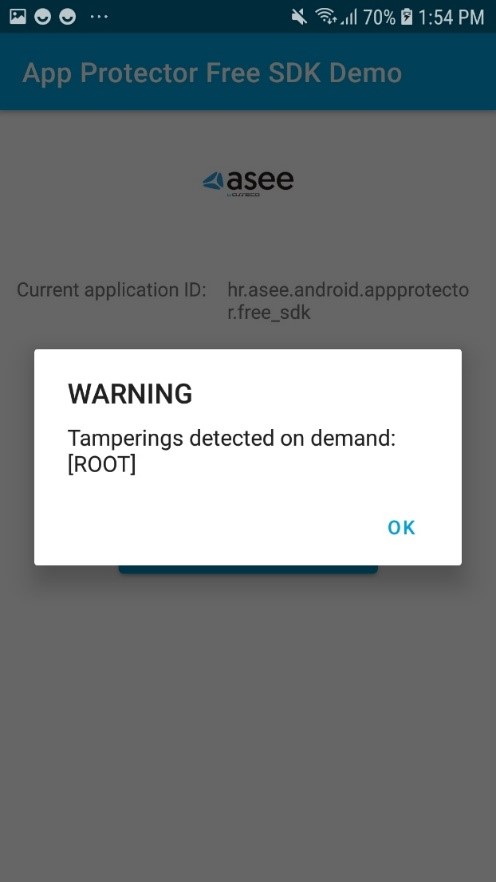
Terminate application
For detected security events that are defined as high risk, it is possible to configure the App Protector to terminate the application. This is the most radical behavior that can be executed, preventing the running of the application. This behavior can act like an application crash, so it would be recommended that the user is also informed about the application closing due to a detected threat.
Portal solution
App Protector Portal
App Protector Portal is a solution that enables clients to create an App Protector configuration for each user and/or mobile application. The Portal could be used when App Protector SDK is implemented in online mode. Using this solution, clients will be able to set which attack App Protector SDK online should detect and choose which response will be created after the attack is detected. App Protector SDK online collects data of detected attacks and sends it to Portal. Based on the inputs from the SDK, the client will be able to see statistics for each platform, Android and iOS.
The figure below represents a high-level App Protector environment.
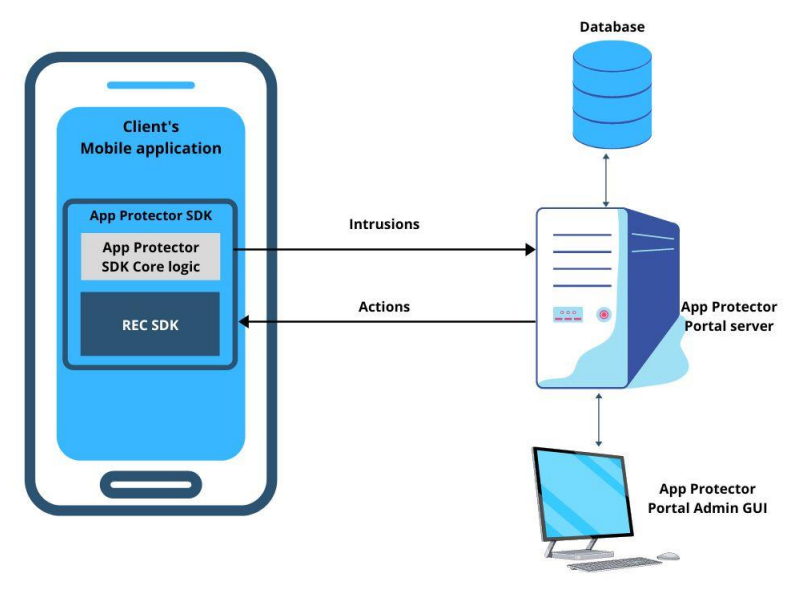
App Protector environment

App Protector attack detection flow
App Protector SDK online implementation consists of:
- App Protector SDK – detects threats on mobile applications;
- REC Server – collects data from App Protector SDK (part of which is REC SDK);
- App Protector Web Portal – allows to client to create new, update or delete existing applications and configurations. Also, the Portal displays statistics about detected attacks;
- App Protector Portal Server – receives all the data (identifiers, applications, and configurations) and saves it in a database.
App Protector SDK, integrated within mobile applications, detects attacks and periodically sends information about the detected threats to REC Server. REC Server collects all data from SDK and communicates with App Protector Portal Server. App Protector Portal Server fetches data from REC Server and passes it to App Protector Web Portal. Communication, between SDK and Servers, is authenticated using access tokens contained in HTTP headers.
App Protector Web Portal
App Protector Web Portal is a web application used for the administration and configuration of App Protector functionality within mobile applications. App Protector Portal GUI allows clients to manage which attacks App Protector should detect and to define responses to detected attacks from a single point. App Protector Portal GUI contains a dashboard that displays current statistics and graphics based on detected attacks for each platform, Android and iOS.
After the Client logs in App Protector Portal web application, it can view statistics and reports displayed on the dashboard and view the list of users. Also, Portal allows the Client to add new or update, delete and configure existing applications. The Portal Web application has a notification inbox that contains a list of activities made by administrators.
App Protector Web Portal Dashboard shows:
- Number of users;
- Number of overall attacks;
- 5 most attacked applications;
- Graphical representation of attacks – overall, over some period or last 24h;
- Number of performed attacks for each detected attack on iOS and Android platforms (Jailbreak/Root, Debugging, Emulator, Hook, Screen Recording).
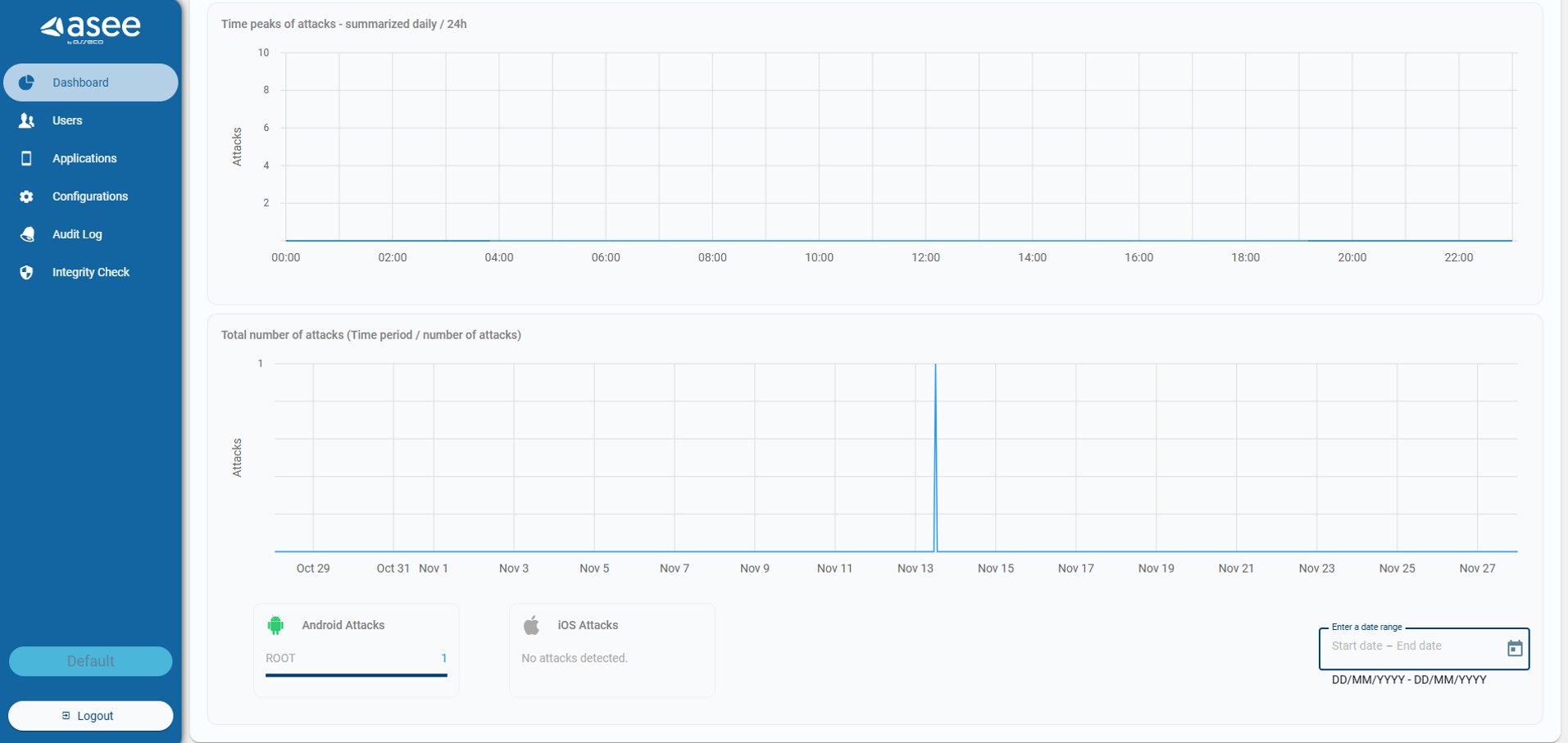
App Protector Web Portal Dashboard
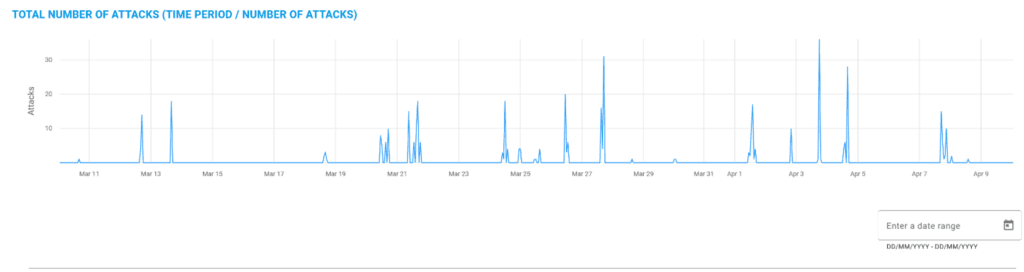
App Protector Web Portal allows the Client to change configuration and settings for all or specific users and for each mobile platform, Android and iOS. The Portal allows the Client to choose which attacks App Protector should detect and define a response for a detected response from one point of interaction.
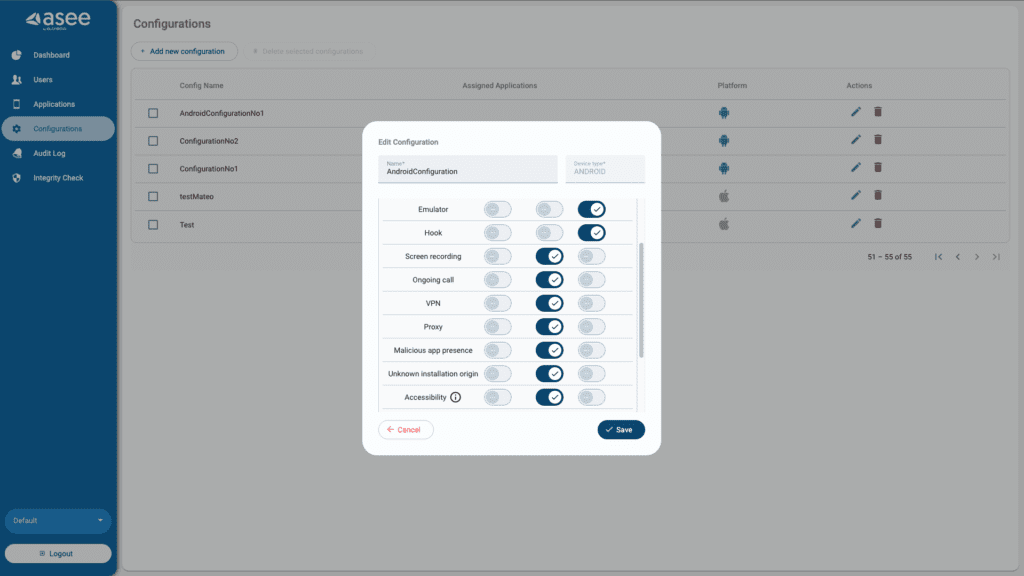
App Protector Configuration
Generally, App Protector is a tool that can be integrated with, or within, a mobile application's runtime environment. The best security preventive environment is built in App Protector SDK which is implemented within the mobile application. Generally, App Protector is tracking device behavior, it analyses what is happening, and based on that it responds to the application. App Protector Portal enables monitoring and logging of detected attacks and changing App Protector configurations using App Protector Portal GUI.
REC SDK
When the App Protector SDK implementation type is online, then part of App Protector SDK is REC SDK as well.
REC, Risk Event Collector, is a component that receives risk indicators from the mobile application and sends them to the risk assessment system. For the purpose of the Risk assessment system to consume risk indicators from mobile applications and REC, the event bus (broker) component is used. REC's main purpose is to connect mobile devices and message queue which can forward the data to a 3rd party system (such as an anti-fraud system). It is a system responsible for collecting mobile device attack information which can later be used for evaluating risk indicators.
Supported platforms
App Protector SDK can be integrated into Android and iOS platforms.
Android SDK is written in Java language but is fully compatible with other JVM languages supported on Android like Kotlin. This framework can be used for target devices from Android 6.0 Marshmallow (API level 23) and higher.
For iOS, there are two, build for Swift or build for Objective-C. Both versions have all the capabilities in terms of runtime self-protection. This framework can be used for target devices from iOS 11.0.
| App Protector SDK | ||
| Platform | Language | OS |
| Android | Java, Kotlin, Flutter | Android 6.0 Marshmallow (API level 23) ++ |
| iOS | Swift, Objective-C, Flutter | 11.0 ++ |
App Protector mobile application requirements
Android integration
Quick Start Guide
1. Include the SDK in the project
- Inside app’s build.gradle module create libs folder if one does not exist.
- Put the JAR archive into libs folder.
- In app project’s build.gradle file in dependencies add one of the following lines depending on the language used:
implementation(files("path-to-sdk.jar"))2. Add the following to the application AndroidManifest.xml file
Permissions
<uses-permission android:name="android.permission.INTERNET" />
<uses-permission android:name="android.permission.ACCESS_NETWORK_STATE" />
<uses-permission android:name="android.permission.DETECT_SCREEN_RECORDING" />
<uses-permission android:name="android.permission.HIDE_OVERLAY_WINDOWS" />
Queries intent declaration
<queries>
    <intent>
        <action android:name="android.intent.action.MAIN" />
    </intent>
</queries>
Service declaration
<service android:name="hr.asseco.android.CustomService"
         android:isolatedProcess="true"/>
3. Include the SDK .jar file to your project in the application build.gradle file
implementation(files("path-to-app-protector.jar"))4. Initialise the RASPFacade as soon as possible in your app, i.e. the Application class
package hr.asseco.android.example;

import android.app.Application;

import java.util.Set;

import hr.asseco.android.rasp.portal.facade.RASPFacade;
import hr.asseco.android.rasp.portal.facade.RASPFacadeFactory;
import hr.asseco.android.rasp.portal.facade.callback.RASPFacadeCallback;
import hr.asseco.android.rasp.portal.facade.callback.UpdateExternalIdentifierCallback;
import hr.asseco.android.rasp.portal.facade.exception.RASPFacadeException;
import hr.asseco.android.rasp.portal.model.RASPPortalInfo;
import hr.asseco.android.rasp.portal.model.error.AppProtectorErrorCodes;
import hr.asseco.android.rasp.portal.model.error.ExternalIdentifierError;
import hr.asseco.android.rasp.portal.model.rasp.RASPConfigPair;
import hr.asseco.android.rasp.portal.model.rasp.RASPConfiguration;
import hr.asseco.android.rasp.portal.model.rasp.RASPDetection;
import hr.asseco.android.rasp.portal.model.rasp.RASPReaction;

public final class AppProtectorPortalApplication extends Application
        implements RASPFacadeCallback, UpdateExternalIdentifierCallback {

    private static final boolean IS_ONLINE_MODE = false;
    private static final String LICENCE_KEY = "licence-key-for-this-app";
    public RASPFacade raspFacade;

    @Override
    public void onCreate() {
        super.onCreate();

        if (RASPFacade.isIsolatedProcess()) {
            return;  // Exit onCreate method if process is isolated
        }

        try {
            raspFacade = RASPFacadeFactory.create(this,
                                                  // Application context
                                                  getRaspPortalInfo(),
                                                  // data class with configuration of either online or offline work mode
                                                  getRASPConfiguration(),
                                                  // Default RASP configuration for detection-reaction pairs
                                                  this, // Callback for detections with NOTIFY_USER reaction
                                                  this // Callback for the result of updating external identifier
                         ).createRASPFacade(LICENCE_KEY.toCharArray());
        } catch (RASPFacadeException e) {
            // Handle issue during initialisation - check error message for information
        }

        final Set raspDetections =
                raspFacade.detectOnDemand(Set.of(RASPDetection.ROOT));
        // Call on demand detection for certain attacks, i.e. root and get results directly
        // Only call this from the background thread as it is a resource intensive method
    }

    private RASPPortalInfo getRaspPortalInfo() {
        if (IS_ONLINE_MODE) { // If you have the Portal, use online mode. Offline otherwise.
            return RASPPortalInfo.forOnlineWorkMode("server-url.com",  // App Protector Portal URL
                                                    "tenant-name", // App protector portal Tenant name
                                                    60L, // Interval for periodic configuration pulling
                                                    30L, // Interval for periodic background RASP detections
                                                    "rec-url.com", // App Protector REC server URL
                                                    300L, // Interval for resending events to Portal even if duplicates occur
                                                    "api-key", // App Protector Portal application specific api-key
                                                    null, // App Protector Portal certificate public key hashes for certificate pinning
                                                   getBlacklistedAppsConfig() // Object containing all blacklisted apps
                                                   );
        } else {
            return RASPPortalInfo.forOfflineWorkMode(30L, getBlacklistedAppsConfig());
            // Interval for periodic background RASP detections + blacklisted app config
       }
   }

    private RASPConfiguration getRASPConfiguration() {
        return new RASPConfiguration(Set.of(
                new RASPConfigPair(RASPDetection.ROOT, RASPReaction.NOTIFY_END_USER),
                // Handle detections differently as they are not equally risky
                new RASPConfigPair(RASPDetection.HOOK, RASPReaction.KILL),
                // For some detections it is enough to warn the user of the risk for using
                new RASPConfigPair(RASPDetection.DEBUGGING, RASPReaction.NOTIFY_END_USER),
                // the application in the current state/device
                new RASPConfigPair(RASPDetection.EMULATOR, RASPReaction.KILL),
                // For example, some users willingly use the application during a call and know
                new RASPConfigPair(RASPDetection.ONGOING_CALL, RASPReaction.NOTIFY_END_USER),
                // the potential danger of giving away sensitive information to unknown callers,
                new RASPConfigPair(RASPDetection.SCREEN_OVERLAY, RASPReaction.NOTIFY_END_USER),
                // but others do not. So show them an alert dialog message to educate them and
                new RASPConfigPair(RASPDetection.SCREEN_RECORDING, RASPReaction.NOTIFY_END_USER),
                // protect them if they are not aware of the risks.
                new RASPConfigPair(RASPDetection.ACCESSIBILITY, RASPReaction.NOTIFY_END_USER),
                new RASPConfigPair(RASPDetection.VPN, RASPReaction.NOTIFY_END_USER),
                new RASPConfigPair(RASPDetection.PROXY, RASPReaction.NOTIFY_END_USER),
                new RASPConfigPair(RASPDetection.MALICIOUS_APPLICATION, RASPReaction.NOTIFY_END_USER),
                new RASPConfigPair(RASPDetection.SPOOFED_LOCATION, RASPReaction.NOTIFY_END_USER),
                new RASPConfigPair(RASPDetection.ADB, RASPReaction.NOTIFY_END_USER),
                new RASPConfigPair(RASPDetection.UNKNOWN_APPLICATION_ORIGIN, RASPReaction.NOTIFY_END_USER),
                new RASPConfigPair(RASPDetection.DEVELOPER_OPTIONS, RASPReaction.NOTIFY_END_USER)));
    }

    private BlacklistedAppsConfig getBlacklistedAppsConfig() {
        return new BlacklistedAppsConfig.Builder()
                .addRemoteControlApplications()
                .blacklistApp(
                        new BlacklistedApp("Malicious App",
                                           "com.example.malicious.app.android"))
                .build();
    }

    @Override
    public void onTamperingDetected(final Set set) {
        // handle the detections if there are any (show message to user, exit the application)
        // Try to adjust each message according to the detection. I.e. for the
        // SCREEN_OVERLAY detection warn them that there is something overlaying the app
        // and educate them of the potential danger if the overlay is from a suspicious source.
    }

    @Override
    public void onExternalIdentifierUpdateSuccess(final String externalIdentifier) {
        // External identifier (third party user management identifier)
        // is successfully updated and its value is returned through this method.
    }

    @Override
    public void onExternalIdentifierUpdateError(final ExternalIdentifierError externalIdentifierError) {
        // During external identifier (third party user management identifier) an error occurred.
        // The details of the error are in this ExternalIdentifierError object
        // Check the error code in the AppProtectorErrorCodes class
        if (externalIdentifierError.getAppProtectorError().getCode()
                == AppProtectorErrorCodes.IDENTIFIER_IS_NOT_VALID_ERROR_CODE) {
            // i.e. the sent external identifier is invalid, check the value sent.
        }
    }
}
Classes and methods overview
The following classes and structures are available:
RASPConfigPairRASPConfigurationRASPDetectionRASPFacadeRASPFacadeCallbackRASPFacadeFactoryRASPPortalInfoRASPReactionUpdateExternalIdentifierCallbackValueProducerCalculateValueBlacklistedAppsConfigBlacklistedApp
RASPPortalInfo
RASPPortalInfo is a model object used for configuration of the App Protector Portal. There are multiple available constructors of this class depending on the SDK work mode (either online or offline)
All available parameters are listed below:
serverUrl– URL of App Protector Portal servertenantName– name of the application tenant (organization)fetchConfigurationPeriod(optional) – period in seconds that defines frequency of RASP configuration fetch (if not set by user, default value of 60 sec will be used)tamperingDetectionPeriod(optional) – period in seconds that defines frequency of RASP attack detection (if not set by user, default value of 30 sec will be used)recBaseUrl– REC server URLdefaultEventReportingInterval– time in seconds used to define how frequently will RASP attacks be sent to REC server if no new attacks are detected (default value 60 sec, minimum value 10 sec)apiKey– API key obtained from RASP Portal web portal used for authenticationtrustedCertificates– list of trusted server certificates to provide certificate pinningblacklistedAppsConfig– object containing information about apps that trigger the app presence (malicious applications) detection when installed on user’s deviceworkMode– work mode of this RASPPortal instance
To create RASPPortalInfo instance, two static methods are available:
forOfflineWorkMode(…) – used for offline SDK work modeforOnlineWorkMode(…) – used for online SDK work mode
public static RASPPortalInfo forOfflineWorkMode(final Long tamperingDetectionPeriod,
final BlacklistedAppsConfig blacklistedAppsConfig)public static RASPPortalInfo forOnlineWorkMode(final String serverUrl,
final String tenantName,
final Long fetchConfigurationPeriod,
final Long tamperingDetectionPeriod,
final String recBaseUrl,
final Long defaultEventReportingInterval,
final String apiKey,
final List<byte[]> trustedCertificates,
final BlacklistedAppsConfig blacklistedAppsConfig)Time-related arguments (period, interval) are optional and can be set to null for default value to be used. Additionally, trustedCertificates argument can be set to null which means that no certificate pinning will be used and blacklistedAppsConfig can be left out which means that no applications are included in the app presence detection (will not trigger).
RASPConfigPair
RASPConfigPair is the model that defines detection-reaction relationship.
It contains RASPDetection and RASPReaction enum member variables where RASPDetection represents type of tampering which is recognized by App Protector Portal SDK and RASPReaction represents reaction on certain tampering detection.
public enum RASPDetection {
    DEBUGGING,
    ROOT,
    HOOK,
    EMULATOR,
    ONGOING_CALL,
    SCREEN_RECORDING,
    SCREEN_OVERLAY,
    ACCESSIBILITY,
    PROXY,
    VPN,
    MALICIOUS_APPLICATION,
    UNKNOWN_APPLICATION_ORIGIN,
    DEVELOPER_OPTIONS,
    ADB,
    SPOOFED_LOCATION
}- DEBUGGING – application is run in debug mode
- ROOT – application is running on rooted device
- HOOK – stacktrace-hook has been detected in the mobile device
- EMULATOR – application is running on an emulator
- ONGOING_CALL – ongoing call while the application is running
- SCREEN_RECORDING – screen recording or screen sharing active while application is running
- SCREEN_OVERLAY – screen overlay present on top of the application screen
- ACCESSIBILITY – non-system accessibility services detected running on device
- VPN – the device has an active VPN connection
- PROXY – the device connection goes through a HTTP proxy
- MALICIOUS_APPLICATION – there are blacklisted applications installed on the device (applications added using the blacklistedAppsConfig parameter of RaspPortalInfo)
- UNKNOWN_APPLICATION_ORIGIN – the application is installed from an unknown/untrusted source (not from an official app store)
- DEVELOPER_OPTIONS – the device has developer options enabled
- ADB – the device has an USB connection while USB debugging is enabled (can’t detect ADB connection over WiFi)
- SPOOFED_LOCATION – detects if location spoofing/mocking is active on device
public enum RASPReaction {

    KILL("KILL"),
    FAKE_VALUES("FAKE_VALUES"),
    NOTIFY_END_USER("NOTIFY_END_USER");

    public final String value;

    RASPReaction(final String value) {
        this.value = value;
    }
}- KILL – kills the application
- FAKE_VALUES – produces fake values when using
calculateValuemethod - NOTIFY_END_USER – invokes
raspFacadeCallbackpassed toRASPFacadeFactory
RASPConfiguration
App Protector Portal SDK can be configured in two dimensions; what should be detected and how to react to detected instances of tampering. This is done through RASPConfiguration class. RASPConfiguration is the model object containing java.util.Set of RASPConfigPair objects. It represents set of detection-reaction relations (reactions are described in document App_Protector_Portal_SDK_Core_Overview).
RASPFacadeFactory
RASPFacadeFactory is a factory class which is used to create instance of RASPFacade. It has only two methods:
// Initializes RASPFacadeFactory object
public static RASPFacadeFactory create(
    @NonNull final Context context,
    @NonNull final RASPPortalInfo raspPortalInfo,
    @NonNull final RASPConfiguration defaultRaspConfiguration,
	@NonNull final RASPFacadeCallback raspFacadeCallback
	@Nullable final UpdateExternalIdentifierCallback updateExternalIdentifierCallback)

// Initializes RASPFacade object
public RASPFacade createRASPFacade(final CharArrayExt licenceKey)
create method – initializes RASPFacadeFactory object with following parameters:
context– application contextraspPortalInfo–RASPPortalInfoobject explained in chapter 4.1.defaultRaspConfiguration–RASPConfigurationthat will be used while no other configuration is fetchedraspFacadeCallback– callback which will be invoked when newRASPDetectionwith reaction ofNOTIFY_END_USERis detected (detection and reaction are explained in section 5.2)updateExternalIdentifierCallback– callback which will be invoked to provide the results of theupdateExternalIdentifiermethod.
createRASPFacade method initializes RASPFacade object from current RASPFacadeFactory and the licence key provided with the SDK.
RASPFacade
RASPFacade is the main entry point for App Protector Portal. It is initialized with RASPFacadeFactory as mentioned above. After we initialize this class, the application is secure from attacks that are described in the document App_Protector_Portal_SDK_Core_Overview.
During the initialization of online mode, requests to the server are made in the background. If the requests fail, they will be automatically scheduled for retry. Exponential backoff is implemented to avoid overloading the server with requests. If the successful request is not achieved in 2,58 minutes the request rescheduling will stop completely.
In that case, to successfully initialize the SDK for online usage, the user will have to stop the app and start it again after the server issues have been resolved.
calculateValue method
calculateValue method will produce real or fake values based on given valueProducer implementation and last known RASPDetections for currently set RASPConfiguration.
Example: If debugging and emulator were detected as vulnerabilities and current RASPConfig states that fake values should be returned as a reaction to debugging, calculateValue will return fake value based on given valueProducer. On the other hand, if current RASPConfig doesn’t contain returning fake values as reaction to any of the detected vulnerabilities, real values will be returned based on given valueProducer.
updateExternalIdentifier method
updateExternalIdentifier method will update external identifier for current user. The result of the method will be returned using the UpdateExternalIdentifierCallback interface that will be executed on the main thread.
endSession
endSession method will end a current session of App Protector Portal SDK. RASPFacade object is not usable after calling this (invoking methods on RASPFacade object after session ended will throw SessionNotInitialized runtime exception). This method is used when user wants to stop using App Protector Portal SDK functionalities (use it before setting RASPFacade object to null to clean up App Protector Portal SDK). After session is ended, new RASPFacade object must be initialized to initialize App Protector Portal SDK again.
NOTE: session must be ended every time before setting RASPFacade object to null, i.e. not using App Protector Portal SDK anymore. Not ending session might result in throwing of a fatal exception.
isSessionInitialized
isSessionInitialized method will return a boolean value. True is returned if session is active and App Protector Portal SDK is running, false otherwise. This method can be used to make sure that RASPFacade object is cleaned up before setting it to null value and to make sure whether App Protector Portal SDK is currently running.
detectOnDemand
detectOnDemand method is used for a single on demand RASP detection. raspDetections parameter represents types of tampering that will be detected by the App Protector SDK in this single on demand tampering detection. The method will return detected tampering instances, or empty Set if no tampering instances are detected.
If the RASPFacade is in online work mode, the detections are sent to the server. The method will return the detections synchronously, as soon as possible, while sending the events to the server in the background to avoid potential wait time if the server is busy.
Screen sharing protection
enableScreenSharingProtection and disableScreenSharingProtection methods are used to start/stop the process of preventing screenshotting and screen recording for every activity that takes the foreground in the future.
If the method enableScreenSharingProtection is called when an activity is already active, that activity will not have the protection until its lifecycle is in onResume.
Calling the method disableScreenSharingProtection will stop applying the protection to future activities.
It is recommended to start the screen sharing protection right after initialising the RASPFacade object and enabling it per activity if it is required.
The method enableScreenshot is for when an activity should be allowed to be screenshotted/screen recorded and the screen sharing protection is active. Then simply call the method with the activity as parameter.
Screen overlay protection
These methods are only available on API level 31 and later.
enableScreenOverlayProtection and disableScreenOverlayProtection methods are used to start/stop the process of preventing the presence of screen overlays on top of your application.
Calling the enable method starts the process for all future activities that run in the foreground.
If the method enableScreenOverlayProtection is called when an activity is already active, that activity will be allowed to have overlays until onResume is called.
It is recommended to enable the screen overlay protection right after initialising the RASPFacade object (only on devices running Android 12 and newer).
Calling the method disableScreensharingProtection will enable future activities to have overlays.
isScreenLockActive
Method used for checking if the device has an active screen lock mechanism applied (PIN, password, pattern, biometrics).
isIsolatedProcess
Method that checks if the current android process is isolated or not. Added as a convenience method because of the CustomService service crashing when trying to access android APIs not allowed for isolated processes.
This usually occurs in the class extending the Application class, most commonly the onCreate method, as the CustomService also executes the lifecycle methods of the Application class.
To prevent this issue, at the start of overridden methods in the Application class check if the process is isolated. If the isIsolatedProcess method returns true, exit the method.
RASPFacadeCallback
RASPFacadeCallback is a callback interface which, when implemented by the user, will return detected tampering instances (only if configuration for the detection is set to NOTIFY_END_USER).
UpdateExternalIdentifierCallback
UpdateExternalIdentifierCallback is a callback which, when implemented by user, will be invoked to pass the results of the update of external identifier to the user.
Methods in this interface are executed on the main thread.
When the method executes successfully, the updated external identifier is passed to the success callback as argument. If the method fails to execute, the details of the error that occurred are passed to the error callback in the ExternalIdentifierError object and the user can then try executing the update method again.
iOS Integration
Adding SDK to iOS Project
The SDK is distributed as a .zip archive. After extracting the package, you will find two separate folders: Swift and ObjectiveC.
Each folder contains the corresponding XCFramework.
To import the XCFramework:
- Drag and drop the appropriate .xcframework file for your target depending on the language
- Select "Copy files to destination" action
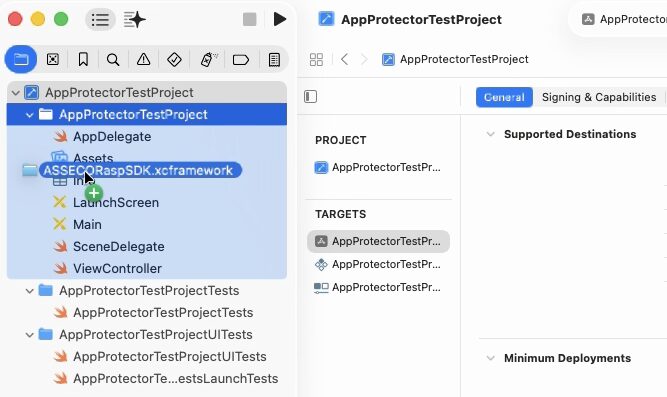
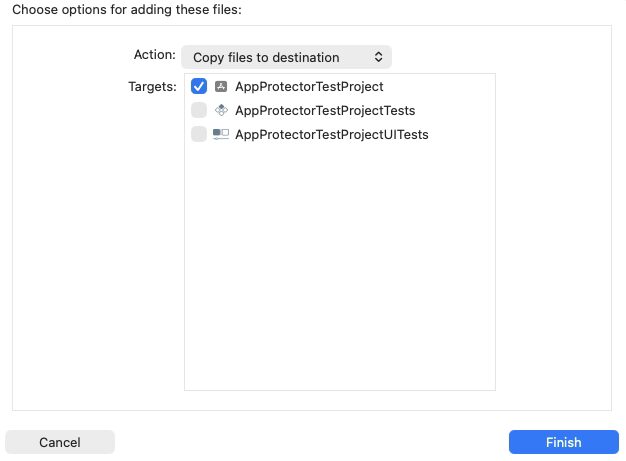
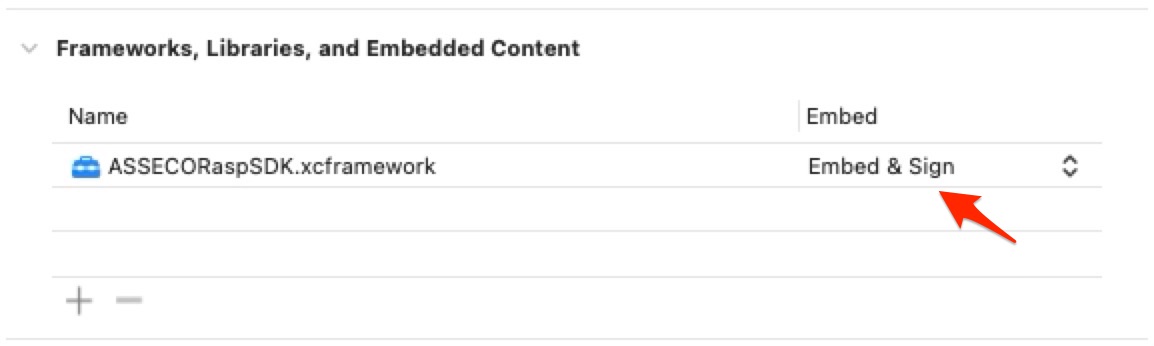
Make sure to Embed & Sign your XCFramework.
Work Modes
AppProtector SDK supports the following two work modes:
- online
- offline
Initialization
RASPPortalInfo is a class that consists of functions for initializing OFFLINE and ONLINE work mode and is used to initialize RASPFacade which is the main class of the App Protector SDK.
This section describes how to initialize AppProtector SDK in two supported work modes.
Offline Work Mode
To initialize App Protector SDK in offline work mode follow the next steps:
- Create RASPPortalInfo object by using the "forOfflineWorkMode" function
- Create RASPFacade and pass al the required parameters
import UIKit
import ASSECORaspSDK

class ViewController: UIViewController, RASPDetectionDelegate {

    var raspFacade: RASPFacade?
    override func viewDidLoad() {
        super.viewDidLoad()
        raspFacade = initializeRaspFacade()
    }

    func initializeRaspFacade() -> RASPFacade? {
        do {
            let raspPortalInfo = try RASPPortalInfo.forOfflineWorkMode(tamperingDetectionPeriod: 30.0)

            let raspFacade = try RASPFacade(raspPortalInfo: raspPortalInfo,
                                            defaultConfig: RaspPortalConfig.notifyUserForAll(),
                                            tamperingDoDetectDelegate: self,
                                            licence: ObfuscatedCharArrayExt.__.x.x.x.minus.x.x.x.minus.x.x.x.minus.x.x.x.toCharArrayExt())
            return raspFacade

        }catch {
            print("Error: \(error)")
            return nil
        }
    }

    func onTamperingDoDetect(raspDetectionType: [RASPDetectionType]) {
        raspDetectionType.forEach { detection in
            switch detection {
            case .JAILBREAK:
                print("Detected JAILBREAK")
            case .DEBUGGING:
                print("Detected DEBUGGING")
            case .SIMULATOR:
                print("Detected SIMULATOR")
            case .HOOK:
                print("Detected HOOK")
            case .SCREEN_RECORDING:
                print("Detected SCREEN_RECORDING")
            case .ONGOING_CALL:
                print("Detected ONGOING_CALL")
            case .VPN:
                print("Detected VPN")
            case .PROXY:
                print("Detected PROXY")
            case .APP_PRESENCE:
                let detectedApps = raspFacade?.checkAppPresence()
                print("Detected APP_PRESENCE \(detectedApps ?? [:])")
            case .SCREEN_LOCK:
                print("Detected SCREEN_LOCK")
            case .SCREENSHOT:
                print("Detected SCREENSHOT")
            case .UNKNOWN_APPLICATION_ORIGIN:
                print("Detected UNKNOWN_APPLICATION_ORIGIN")
            case .DEVELOPER_MODE:
                print("Detected DEVELOPER_MODE")
            default:
                break
            }
        }
    }
}
Online Work Mode
To initialize App Protector SDK in online work mode follow the next steps:
- Create RASPPortalInfo object by using the "forOnlineWorkMode" function
- Create RASPFacade and pass al the required parameters
- Call updateSerialNumber function
import UIKit
import ASSECORaspSDK

class ViewController: UIViewController, RASPDetectionDelegate {

    var raspFacade: RASPFacade?
    override func viewDidLoad() {
        super.viewDidLoad()
        raspFacade = initializeRaspFacade()
        DispatchQueue.main.asyncAfter(deadline: .now() + 1) {
            self.updateExternalIdentifier()
        }
    }

    func initializeRaspFacade() -> RASPFacade? {
        do {
            let raspPortalInfo = try RASPPortalInfo.forOnlineWorkMode(serverURL: "server URL provided by ASEE",
                                                                      tenantName: "tenant name provided by ASEE",
                                                                      bundleID: "your.applications.bundle.id",
                                                                      fetchConfigurationPeriod: 10.0,
                                                                      tamperingDetectionPeriod: 30.0,
                                                                      keychainAccessGroup: "[TEAM_ID].[BUNDLE_ID]",
                                                                      recBaseURL: "REC URL provided by ASEE",
                                                                      defaultEventReportingInterval: 30.0,
                                                                      apiKey: "API KEY obtained from App Protector Portal",
                                                                      trustedCertificates: [], // if certificate/public key pinning is used
                                                                      pinningType: PinningType.NoOpPinning)

            let raspFacade = try RASPFacade(raspPortalInfo: raspPortalInfo,
                                            defaultConfig: RaspPortalConfig.notifyUserForAll(),
                                            tamperingDoDetectDelegate: self,
                                            licence: ObfuscatedCharArrayExt.__.x.x.x.minus.x.x.x.minus.x.x.x.minus.x.x.x.toCharArrayExt())
            return raspFacade

        }catch {
            print("Error: \(error)")
            return nil
        }
    }

    func updateExternalIdentifier(){
        guard (raspFacade != nil) else {
            print("Facade not initialized")
            return
        }
        raspFacade?.updateSerialNumber(externalIdentifier: "[Your external identifier]") {
            print("Succesfully updated external identifier")
        } failure: { error in
            print("Error while updating external identifier: \(error)")
        }
    }

    func onTamperingDoDetect(raspDetectionType: [RASPDetectionType]) {
        raspDetectionType.forEach { detection in
            switch detection {
            case .JAILBREAK:
                print("Detected JAILBREAK")
            case .DEBUGGING:
                print("Detected DEBUGGING")
            case .SIMULATOR:
                print("Detected SIMULATOR")
            case .HOOK:
                print("Detected HOOK")
            case .SCREEN_RECORDING:
                print("Detected SCREEN_RECORDING")
            case .ONGOING_CALL:
                print("Detected ONGOING_CALL")
            case .VPN:
                print("Detected VPN")
            case .PROXY:
                print("Detected PROXY")
            case .APP_PRESENCE:
                let detectedApps = raspFacade?.checkAppPresence()
                print("Detected APP_PRESENCE \(detectedApps ?? [:])")
            case .SCREEN_LOCK:
                print("Detected SCREEN_LOCK")
            case .SCREENSHOT:
                print("Detected SCREENSHOT")
            case .UNKNOWN_APPLICATION_ORIGIN:
                print("Detected UNKNOWN_APPLICATION_ORIGIN")
            case .DEVELOPER_MODE:
                print("Detected DEVELOPER_MODE")
            default:
                break
            }
        }
    }
}
Configuration
RaspPortalConfig encapsulates all different types of reactions the SDK can do depending on detected tamperings. Each configuration consists of two parts. First part specifies which tampering should be checked for: jailbreak, debug, simulator, hook, screen recording, ongoing call, vpn, proxy, app presence, screen lock, screenshot, unknown application origin and developer mode. The second part defines what reaction should be done for that specified tampering.
For each detection you can choose one of three possible reactions:
- notify user
- terminate app
- fake values
Following is one example of custom configuration:
let config: [RaspPortalConfig] = [.JailbreakNotifyUser,
                                  .HookTerminateApp,
                                  .DebugFakeValues,
                                  .OngoingCallTerminateApp]

let raspFacade = try RASPFacade(raspPortalInfo: raspPortalInfo,
                                defaultConfig: config,
                                tamperingDoDetectDelegate: self,
                                licence: ObfuscatedCharArrayExt.__.x.x.x.minus.x.x.x.minus.x.x.x.minus.x.x.x.toCharArrayExt())
For more detection-reaction combinations please check out the RaspPortalConfig class by clicking
cmd + RaspPortalConfig in Xcode.
RaspPortalConfig provides three specific configurations that will:
- terminate app on any detection
- fake values on any detection
- notify user on any detection
Following are the examples of those three configurations:
let config: [RaspPortalConfig] = RaspPortalConfig.terminateAppForAll()

let raspFacade = try RASPFacade(raspPortalInfo: raspPortalInfo,
                                defaultConfig: config,
                                tamperingDoDetectDelegate: self,
licence: ObfuscatedCharArrayExt.__.x.x.x.minus.x.x.x.minus.x.x.x.minus.x.x.x.toCharArrayExt())let config: [RaspPortalConfig] = RaspPortalConfig.fakeForAll()
let raspFacade = try RASPFacade(raspPortalInfo: raspPortalInfo,
defaultConfig: config,
tamperingDoDetectDelegate: self,
licence: ObfuscatedCharArrayExt.__.x.x.x.minus.x.x.x.minus.x.x.x.minus.x.x.x.toCharArrayExt())let config: [RaspPortalConfig] = RaspPortalConfig.notifyUserForAll()
let raspFacade = try RASPFacade(raspPortalInfo: raspPortalInfo,
defaultConfig: config,
tamperingDoDetectDelegate: self,
licence: ObfuscatedCharArrayExt.__.x.x.x.minus.x.x.x.minus.x.x.x.minus.x.x.x.toCharArrayExt())Fake Values
Fake values reaction is used in combination with calculate function in the following way:
    func fakeValuesEample(){
        raspFacade?.calculate {
            calculateTrueValue(someValue: 10)
        } fakeProducer: {
            calculateFakeValue(someValue: 10)
        }

    }

    func calculateTrueValue(someValue: Int) {
        print("I am a non fake producer!")
        print(someValue)
    }

    func calculateFakeValue(someValue: Int) {
        print("I am a fake producer!")
        print(someValue - 20)
    }
When a detection occurs and the configured reaction is fakeValues, the calculate function invokes calculateFakeValue. If no detections occur, calculate always returns calculateTrueValue.
On Demand Detection
Once RASPFacade has been initialized, the detectOnDemand() function can be called at any time. The function will return detected tamperings, but only taking into consideration tamperings defined by the input parameter onDemandConfig array.
    func detectOnDemandExample(){
        let detections = raspFacade?.detectOnDemand(onDemandConfig: [.JAILBREAK, .DEBUGGING, .SIMULATOR, .HOOK])

        detections?.forEach { detection in
            switch detection {
            case .Jailbreak:
                print("Detected JAILBREAK")
            case .Debug:
                print("Detected DEBUGGING")
            case .Simulator:
                print("Detected SIMULATOR")
            case .Hook:
                print("Detected HOOK")
            default:
                break
            }
        }
    }
App Presence Detection
This detection is specific. It performs an on demand check of the presence of applications whose URL schemes are defined in the app’s Info.plist under the LSApplicationQueriesSchemes key. The function checkAppPresence takes no input parameters and returns a dictionary where each key corresponds to one of the URL schemes listed in the plist, and the associated Boolean value indicates whether the corresponding application is installed (true) or not (false).
Unlike the periodic detection mechanism, which only reports whether any specified application was detected, this method returns the full dictionary of results, providing a detailed overview of the installation status for each queried scheme. For example, the returned dictionary may look like: ["tvqs": true, "rustdesk": false].
   func checkAppPresenceExample(){
        let detectedApps = raspFacade?.checkAppPresence()
        print("Detected apps: \(detectedApps ?? [:])")
    }
Application schemes that should be checked must be specified in the Info.plist file under the LSApplicationQueriesSchemes key as shown in the example below:
<key>LSApplicationQueriesSchemes</key>
<array>
		<string>tvqs</string>
		<string>tvcontrol1</string>
        <string>teamviewerTVCv1</string>
        <string>teamviewer</string>
        <string>rustdesk</string>
</array>
Only after a correct entry is added to the LSApplicationQueriesSchemes list will that
application be eligible for on demand and periodic app presence detection.Screen Sharing Protection
Screen sharing protection prevents screenshots and screen recordings of your app. When enabled, it will prevent window’s visual content from being captured by screenshots or screen recording tools. Any attempt to capture the screen will result in protected application’s content to appear blank.
To enable screen sharing protection call the following function:
raspFacade?.enableScreenSharingProtection()To disable screen sharing protection call the following function:
raspFacade?.disableScreenSharingProtection()Development Guides
For more details on this solution check out the App Protector SDK development guides.