Freemium SDK
NOTE: This overview refers to the App Protector free SDK! To view the full overview of the App Protector solution go to the App Protector SDK page.
Introduction
App Protector Freemium SDK enables limited threat detection on mobile devices.
Supported detections are:
- Jailbreaking detection for iOS devices;
- Rooting detection for Android devices;
Supported reactions to detected threats are:
- Notify the user;
Supported detections and reactions are described below.
Security detections
Jaibreak detection
Jailbreaking is the process of removing the limitations put in place by a device's manufacturer. Jailbreaking is generally performed on Apple iOS devices, such as the iPhone or iPad. Jailbreaking removes the restrictions Apple puts in place, allowing you to install third-party software from outside the app store. Some people may have the perception that jailbreaking is only used for piracy, but this is not the case – jailbreaking allows you to do things like change your iPhone's default browser and mail client. Essentially, jailbreaking allows you to use software that Apple doesn't approve of. Also, it removes restrictions in inter-application communications, accessing files of other applications, and gives the user root access.
App Protector detects if the device is jailbroken and also has a large "blacklist" of unwanted libraries and checks if some library from the "blacklist" exists on the client's device. Furthermore, App Protector checks if the client's device has access permission to suspicious directories (directories to which the client does not have access permission by default).
Root detection
Rooting is the process of removing the limitations put in place by a device's manufacturer and gaining superuser access to device resources as on Linux. Rooting is generally performed on Android devices. The process is usually done in order to overcome the limitations that carriers put on mobile devices. Thus, rooting gives permission to alter or replace system applications and settings. It also gives the user permission to execute privileged commands which are not available to the device in stock configuration. It is also required in order for more advanced and potentially dangerous operations including modifying or deleting system files, removing preinstalled applications, and low-level access to the hardware itself.
App Protector will detect whether any of the known root packages exist on the client device and whether the kernel that is installed was signed with non-release keys while it was compiled. Besides that, App Protector will detect whether root privileges, which are not available on a non-rooted device, are available on the client device.
Security detections reactions
Notify user
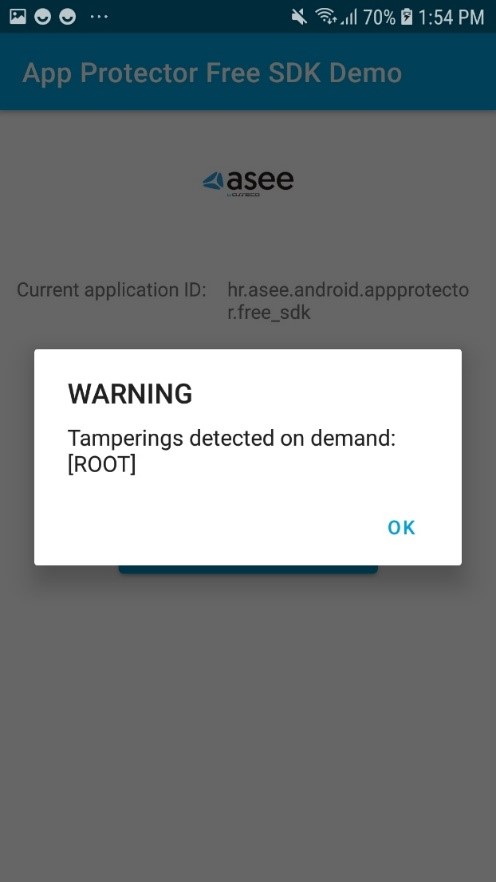
When a security event is detected, App Protector returns information about the detected problem on the device – to the application that implements it. This information can be shown to the user. This reaction is on the information level, only reporting the detected event. These events can be handled on the application level, i.e., for root detection, the user can be just informed about the possible security issue, or the application can be terminated. Example of notifying user:
Freemium SDK configuration
Android integration
Classes and method overview
The following classes and structures are available (in alphabetical order):
- RASPDetection;
- RASPFacade;
- RASPFacadeFactory;
RASPDetection
RaspDetection represents type of tampering which is recognized by SDK. In free version of SDK only ROOT tampering detection is available:
public enum RASPDetection {
    ROOT
}- ROOT – application is running on rooted device;
RASPFacadeFactory
RASPFacadeFactory is a factory class which is used to create instance of RASPFacade. It has only two methods:
public final class RASPFacadeFactory {

    private final Context context;

    public static RASPFacadeFactory create(@NonNull final Context context) {
        return new RASPFacadeFactory(context);
    }

    private RASPFacadeFactory(@NonNull final Context context) {
        this.context = context;
    }

    public RASPFacade createRASPFacade() throws RASPFacadeException {
        return RASPFacade.newInstance(ObjectFactory.create(context));
    }
}createmethod – initializesRASPFacadeFactoryobject;createRASPFacademethod – initializesRASPFacadeobject from currentRASPFacadeFactory;
RASPFacade
RASPFacade is the main entry point for App Protector. It is initialized with RASPFacadeFactory as mentioned above. After we initialize this class an application can detect ROOT tampering. RASPFacade contains doDetectOnDemand method:
Set<RASPDetection> doDetectOnDemand(Set<RASPDetection> raspDetections);doDetectOnDemand
doDetectOnDemand method is used for a single on demand App Protector detection. raspDetections parameter represents types of tampering that will be detected by the SDK in this single on-demand tampering detection. The method will return detected tampering, or an empty Set if no tampering is detected.
App Protector SDK sample usage
RASPFacade initialization
Before using any method from RASPFacade instance, it needs to be created and initialized by using RASPFacadeFactory and its two methods:
createandcreateRASPFacade.
private void initializeRaspFacade() {
    try {
        raspFacade = RASPFacadeFactory.create(getApplicationContext())
                                      .createRASPFacade();
    } catch (RASPFacadeException raspFacadeException) {
        // Handle expected error...
    }
}
Initializing RASPFacade can throw a RASPFacadeExpection if the RASPFacade object is created in the wrong way, e.g. if the wrong application context was passed to the create method.
detectOnDemand usage
After RASPFacade has been initialized, the detectOnDemand method can be called at any time. The method will return detected tampering, or an empty Set if no tampering is detected.
void detectOnDemand() {
    final Set<RASPDetection> detections = raspFacade.detectOnDemand(EnumSet.of(RASPDetection.ROOT));
    // Handle detected tamperings...
}
RASPFacade usage
private void dummyRASPFacadeUsage() {
    try {
        initializeRaspFacade();
        detectOnDemand();

    } catch (final RASPFacadeException raspFacadeException) {
        // Handle expected error...
    }
}
iOS Integration
Adding SDK to iOS Project
The SDK is distributed as a .zip archive. After extracting the package, you will find the XCFramework.
To import the XCFramework:
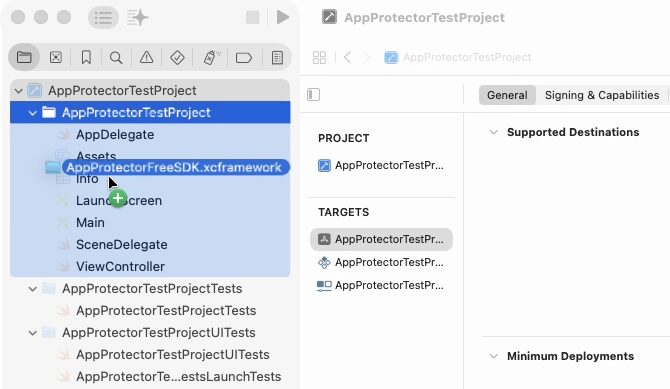
- Drag and drop the appropriate .xcframework file for your target depending on the language
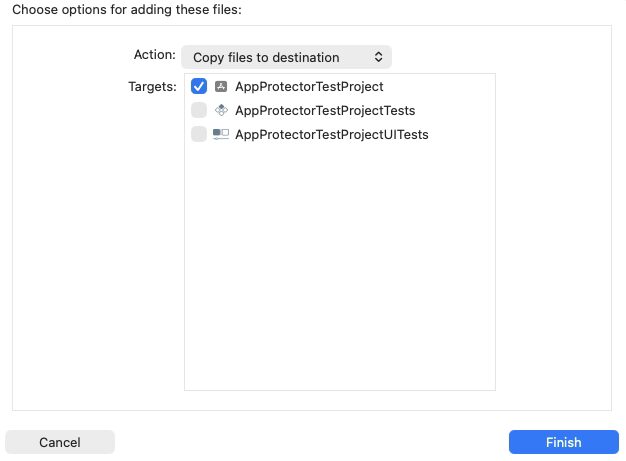
- Select "Copy files to destination" action
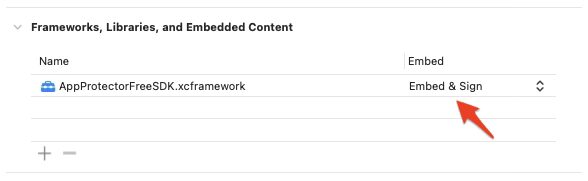
Make sure to Embed & Sign your XCFramework.
Detections and Reactions
App Protector Freemium SDK supports the following detections:
- JAILBREAK
- UNTRUSTED SOURCE
- UNOFFICIAL CODE SIGNATURE
and reactions:
- NOTIFY USER
Untrusted Source detects that the app was not downloaded from the App Store, and Unofficial Code Signature detects that the app is not signed with an App Store or In-House certificate.
Implementation example
You can integrate the App Protector Freemium SDK into your project as follows:
import UIKit
import AppProtectorFreeSDK

class ViewController: UIViewController {

    override func viewDidLoad() {
        super.viewDidLoad()
        testFreeAppProtectorSDK()

    }

    func testFreeAppProtectorSDK(){
        let raspConfig: [RaspConfig] = [.JailbreakNotifyUser]
        let detections = RaspFacade.doDetectOnDemand(raspConfiguration: raspConfig)

        detections.forEach { detection in
            switch detection {
            case .Jailbreak:
                print("Detected JAILBREAK")
            case .UntrustedSource:
                print("Detected UNTRUSTED SOURCE")
            case .UnofficalCodeSignature:
                print("Detected UNOFFICIAL CODE SIGNATURE")
            default:
                break
            }
        }
    }
}
Demo App
An example of app with integrated App Protector Freemium SDK can be found on GitHub.